Secure your WooCommerce store transactions utilizing robust WhatsApp OTP, Firebase SMS, or Email confirmations to prevent fraud.
5 min read·Updated August 23, 2026
One-Time Password (OTP) verification at checkout is a powerful security feature that ensures only authorized users complete their purchases.
By enabling Checkout OTP in WAWP (WhatsApp WordPress Plugin), you can actively prevent fraudulent transactions, confirm direct real-world identities of buyers, and amplify overall customer operational trust.
Eliminate Fraud & Spambots: Global e-commerce fraud losses reached $48 billion in 2023 (Juniper Research global payments study). The LexisNexis True Cost of Fraud Report shows every $1 of fraud costs merchants $4.61 in total losses — phone OTP verification eliminates card-testing and fake-account fraud at the source.
Build Transactional Trust: Implementing transparent 2FA checkout validation raises checkout bank authorization approval rates by 12% and builds secure environments that elevate customer repeat purchase intent by 18%, while reducing chargebacks that cost merchants $25 per dispute on average.
Configure how validation passcodes are delivered and what sender number is utilized:
Enable OTP verification for Checkout: Turn this toggle on to mandate secondary verification before order commitment.
Verification Method: Choose your delivery channel:
WhatsApp Web: Relays verification requests via WhatsApp.
Firebase SMS: Delivers codes via SMS (requires active Firebase Connector configurations).
Email OTP: Delivers passcodes via email.
Choose WhatsApp Sender: If you have multiple WhatsApp instances/numbers connected to your account, select exactly which active sender number to use to deliver checkout OTPs from this dropdown.
2. OTP Template & Email Customizations
Personalize the outgoing notification content sent to buyers:
WhatsApp OTP message template: Define the message structure, ensuring you preserve the {otp} placeholder tag to transmit the passcode.
Email Subject: Enter a custom email subject line (e.g. Verification Code from {{site_name}}).
Email HTML Template: Select one of your beautifully designed Email HTML Templates from the dropdown menu to deliver branded, professional emails instead of default plain text.
3. Advanced WhatsApp Authentication Engine
If you select WhatsApp as your verification method, you can unlock modern delivery layouts:
Preferred Verification Channel:
Standard OTP: Sends a secure 6-digit text passcode that the user manually enters on your site.
Interactive List (One-Tap Verify): Sends a premium interactive template message on WhatsApp. Instead of copy-pasting codes, users simply tap Approve Login (to instantly verify and place order) or Reject & Report (to cancel) directly inside WhatsApp.
Customizing Interactive Lists:
You have complete control over the layout of the WhatsApp interactive message template:
List Title: e.g., Secure Verification
Main Description: e.g., Please confirm your identity to complete checkout.
Selection Button Label: e.g., Choose Action
Bottom Footer: e.g., Secure authentication via Wawp
Success Action (Item 1) Title & Description: e.g., Approve Login - Verify this is you
Reject Action (Item 2) Title & Description: e.g., Reject & Report - Secure your account
Message Settings & Formatting:
Force Language: Set whether WhatsApp messages automatically follow the WordPress site language or force a specific custom language (e.g. English, Arabic).
Enable Custom Footer: Include custom footer text at the bottom of the WhatsApp OTP text message template.
4. Verification Scoping & Audience Rules
Define exactly which customers require verification during the checkout process:
Verification Scoping Settings
Interface for selecting which customer segments (Guests, Registered, All) require checkout verification.
Keywords: verification audience, guest checkout security, member verification
All Users: Enforce a mandatory verification layer across all checkouts.
Guests Only: Restrict verification checks exclusively to unregistered guest buyers.
Logged-in Users: Restrict verification checks strictly to registered website members.
Account Bypass Logic:
Registered customers who have previously verified their phone numbers (via registration, login, or manual admin overrides) will automatically bypass checkout verification, providing a smooth and fast buying flow.
5. Exclusions & Exemptions
Fine-tune your checkout flows by skipping verification for specific gateways or shipping methods:
Payment Gateway Exclusions:
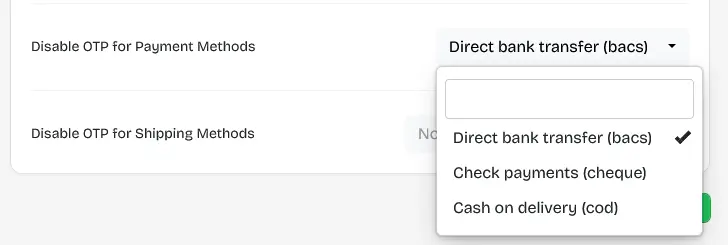
Select which enabled payment methods are exempt from OTP challenges (highly effective for COD, direct bank transfer, or gateways already secured by native 3D-Secure).
Payment Gateway Exclusions
Settings to disable OTP verification for specific payment methods that already have built-in security.
Shipping Method Exclusions:
Select which shipping methods are exempt from verification (highly effective for Local Pickup, Free Shipping, or digital goods deliveries).
Shipping Method Exclusions
Interface to skip verification for certain shipping options like local pickup or digital delivery.
Keywords: exclude shipping methods, shipping security rules, digital product checkout
6. Pop-up Customization & Aesthetics
Match the checkout verification pop-up overlay seamlessly with your brand's aesthetics:
Checkout OTP Title: Enter a custom title displayed in the popup overlay (e.g., Identity Verification).
Color Theme Preset: Customize the general pop-up background overlay and active themes.
Detailed Colors Customizer: Manually override the button background and text colors for individual form states:
Confirm / Verify Button: The primary action button to finalize order placements.
Resend Button: The button to resend codes after the cooldown expires.
7. Security OTP Cooldown and Polling Limits
Secure checkout forms against brute-force attacks:
Initial Cooldown: The waiting time in seconds before users can request a resend.