If you’re ready to start using Wawp's services, the first step is to create your secure central Wawp account.
How to Create your Wawp account
This quick guide walks you through the easy process of creating your Wawp account, from filling out the registration form and choosing your preferred verification channel (WhatsApp, SMS, or Email) to automatic Google sign-in resolution.
3 min read·Updated August 23, 2026

Fast Onboarding
The process is fast, easy, and will get you ready to automate WhatsApp communications in no time.
Step 1: Go to the Wawp Sign-up Portal
Navigate to the official Wawp Sign-up Portal. This secure gateway provides the core registration form required to configure your dedicated developer workspace.
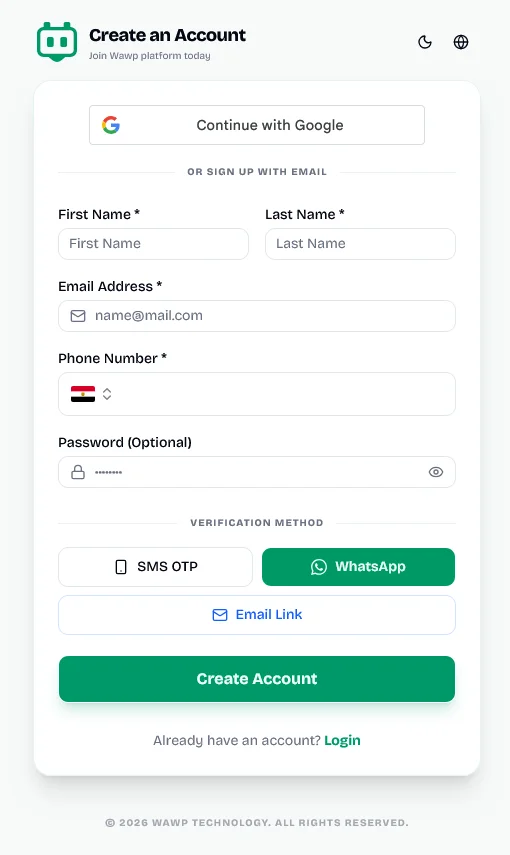
The central registration form layout for creating a new Wawp account with email and phone options.
Keywords: wawp signup, create account, registration formInstant One-Click Google Registration
For the fastest possible integration, click the prominent "Continue with Google" button located directly at the top of the registration form. The gateway synchronizes your authorized profile instantly, provisioning your brand-new workspace on the fly without requiring standard verification challenges.
Step 2: Fill in Your Personal Information
On the main sign-up form, provide your operational credentials to initialize your account configuration:
- First Name: Enter your official first name.
- Last Name: Enter your official last name.
- Email Address: Specify a valid, accessible email address. This serves as your primary master account handle.
- Phone Number: Pick your geographic country flag prefix from the dropdown and provide your complete cellular number.
- Password (Optional): Define a custom administrative password, or leave the field blank if you prefer passwordless authorization flows.
Flexible Authentication
Note: Omitting a password during signup is fully supported. You can establish persistent access using multi-channel verification and configure a standard password later directly from your dashboard settings.
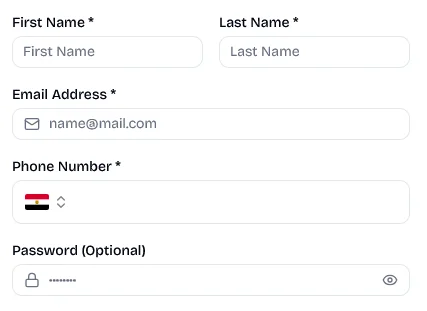
Fields for entering personal details including name, email, and phone number during account creation.
Keywords: account info, signup credentials, personal dataStep 3: Choose Your Preferred Verification Method
Before submitting your registration profile, select the primary communication channel the Wawp system should use to verify your phone number or identity:
- WhatsApp (Recommended): Dispatches an instant 6-digit verification code directly to your WhatsApp application feed.
- SMS OTP: Delivers a secure single-use confirmation code via standard cellular carrier text messaging.
- Email Link: Sends a secure verification button directly to your inbox, allowing seamless one-click authorization.
Once your profile details are fully provided and your active verification channel is highlighted, click the primary green "Create Account" button.
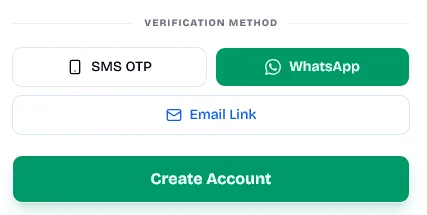
The primary action button to submit the registration form and move to the verification step.
Keywords: create account button, submit registration, signup triggerStep 4: Complete the Verification Challenge
Depending on the channel selected, check your active application feed or messaging inbox for the unique Wawp platform confirmation token. Enter the code into the verification challenge layout to establish a verified session.
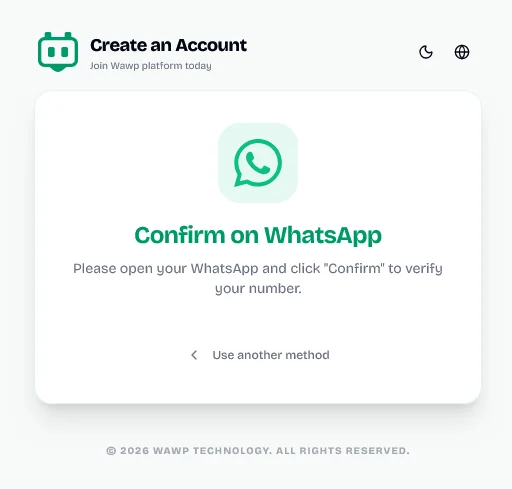
The final verification screen where users enter the OTP code received via their chosen channel.
Keywords: verify account, otp entry, registration completeOnce successfully validated, your workspace initializes instantly, landing you directly inside your centralized master dashboard.
🎉 Welcome to the Wawp family! You can now explore all active channels, developer keys, and automation builder tools available in your dashboard.
What’s Next?
Now that your Wawp account is active and verified, follow the next guide to link your WhatsApp instances, which unlocks robust access to the developer API along with full production integrations for WooCommerce, Google Sheets, n8n workflows, and more.
Did this page help you?
99% found this article helpful (197 likes)
Related Articles
How to Login to your Wawp Account
Learn how to access your Wawp dashboard securely using all available authentication methods, including classic Email & Password credentials, instant SMS OTP, Passwordless WhatsApp interactive lists, and one-click Google Sign-in.
How to Connect WhatsApp to Wawp
Learn how to connect your WhatsApp number to Wawp using QR code or Login code, and manage your connection via the instance dashboard.
Customizing Device & Browser Emulation for Safe Connections
Learn how to create a WhatsApp instance, select the optimal server, and configure device & browser emulation to mimic your real-world setup for maximum number security and ban prevention.
- Need help? Contact Support.
- Check out our Changelog.
- Join our Facebook Community.
- LLM? Read llms.txt.
OFFER ENDS SOON
Extra 30% OFF All Plans
Use this exclusive promo code at checkout to enjoy an extra 30% discount on top of current sales!
BOOST30