Managing a busy WooCommerce store requires speed, clarity, and control over order state transitions. The Wawp plugin bridges the gap between your store's database and your messaging flows by introducing the Orders & Status Customizer and the Wawp Actions metabox.
Customizing WooCommerce Orders & Statuses
Register custom WooCommerce order statuses, style elegant dynamic badges, add custom columns, and send notifications directly from order management screens.
8 min read·Updated August 23, 2026

These integrated features allow you to create custom order statuses, design high-end badge layouts, append informative data columns directly to your master orders table, and manually dispatch transactional notifications inside individual order screens.
ROI IMPACTBUSINESS IMPACT & ROI
Customer Trust & Lifetime Value (LTV): Providing transparent, proactive order tracking (such as branded WhatsApp status alerts for custom states) increases customer lifetime value (LTV) by 25% and repeat shopping rates by 30% (Salesforce Connected Customer Report statistics). Fulfillment Efficiency: Utilizing customized administrative order columns and instant row quick-send actions reduces manual order processing overhead by 45% and cuts down order-status customer tickets by 30% (Accenture Customer Loyalty Study findings).
Core System Capabilities
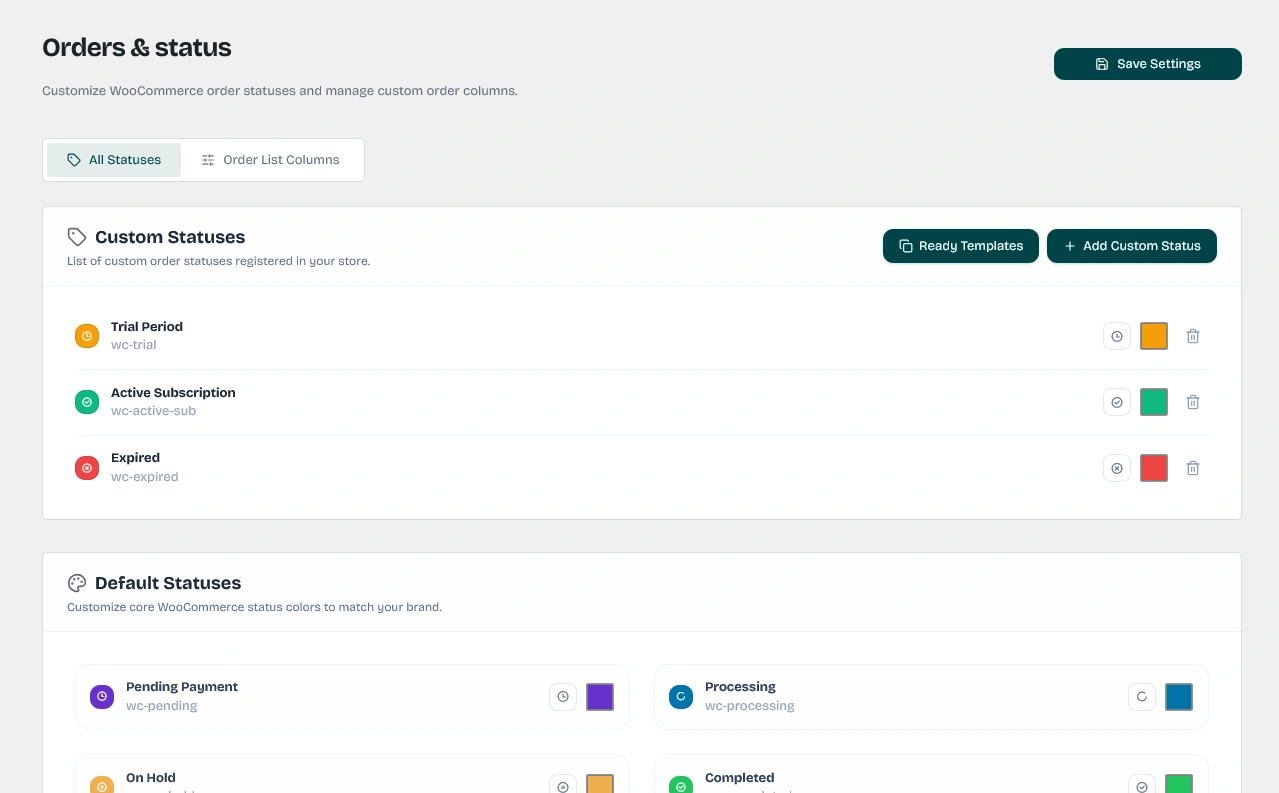
- Custom Order Status Registration: Create infinite custom order statuses (e.g., "Shipped", "Ready for Pickup", "Delivered") that register natively with WooCommerce core hooks.
- Sleek Pastel Badges: Generate beautiful, modern pill-style status badges with custom Remix Icons and tailored light pastel backgrounds automatically derived from your status brand color.
- Enhanced Data Columns: Enrich the main WooCommerce orders screen (
wc-orders) with dedicated columns for Products, Payment Gateways, Shipping Methods, Costs, and Verified WhatsApp details. - AJAX Row Quick-Send Actions: Resend status notifications to customers directly from the row of the WooCommerce orders list with a single click, receiving immediate visual confirmation.
- Aggressive Metabox Ordering: Injects the manual actions panel at the absolute top of the side column within the edit order page, ensuring it is always visible to your store managers.
Part 1: Configuring Custom Statuses & Badges
Under the Orders & Status settings section, you can toggle the main feature switch to customize WooCommerce statuses.
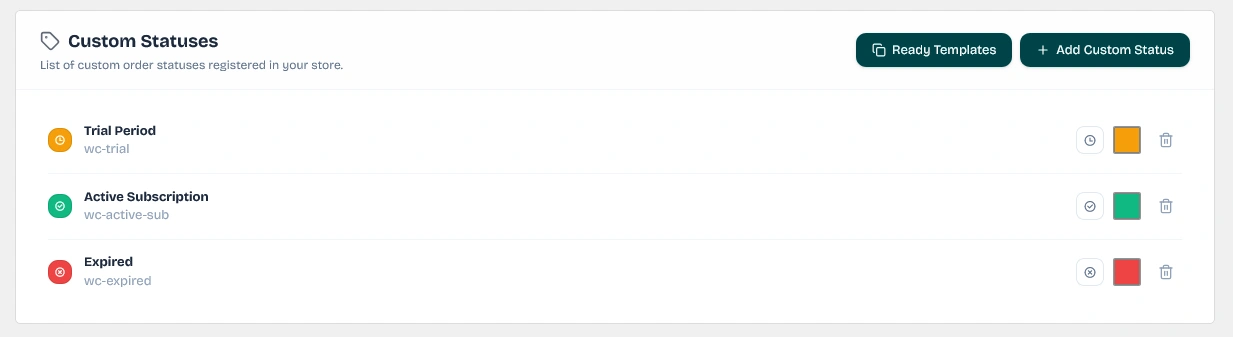
1. Custom WooCommerce Order Statuses
When you add a new custom status (e.g. "Shipped"), the Wawp plugin performs the following behind-the-scenes integrations:
- WordPress Core Registry: Registers your custom slug (prefixed with
wc-to formwc-shipped) under the standard WordPressregister_post_statushook on theinitaction (priority 20). - WooCommerce Core Integration: Automatically hooks into the
wc_order_statusesfilter to merge your new status into the default WooCommerce lists. This ensures the status is natively recognized by WooCommerce, payment gateways, and third-party shipping plugins. - Bulk Edit Integration: Appends your custom status options directly to the WooCommerce bulk actions dropdown menu. Merchants can select multiple orders and execute "Change status to [Custom Status]" simultaneously.
2. Designing Pill-Style Status Badges
To elevate the visual interface of your admin workspace, Wawp replaces default text labels with high-end status badges. The plugin injects custom CSS rules into the admin panel's <head> section.
Each badge is calculated using a harmonious color blending formula based on the hex color you assign to the status:
- Pastel Blended Background: Sets a light background by using your hex color with
1aadded for 10% opacity (e.g.,#22c55e1afor green). - Subtle Styled Border: Generates a matching border by adding
4dfor 30% opacity. - Solid Core Font Color: Renders the text in the 100% solid brand color.
- Icon Prepending: Integrates a responsive Remix Icon chosen by the user and mapped directly to its CSS unicode representation.
Remix Icon Unicode Mapping Examples:
- ri-truck-line:
\f231(Ideal for shipping states) - ri-checkbox-circle-line:
\eb81(Ideal for completed/success states) - ri-loader-4-line:
\eec6(Ideal for processing/spinner states) - ri-error-warning-line:
\eca1(Ideal for failed/warning states) - ri-time-line:
\f20f(Ideal for pending states)
Part 2: Enhancing the WooCommerce Orders Table (wc-orders)
You can enable additional details as columns to display directly inside your master WooCommerce Orders list table.
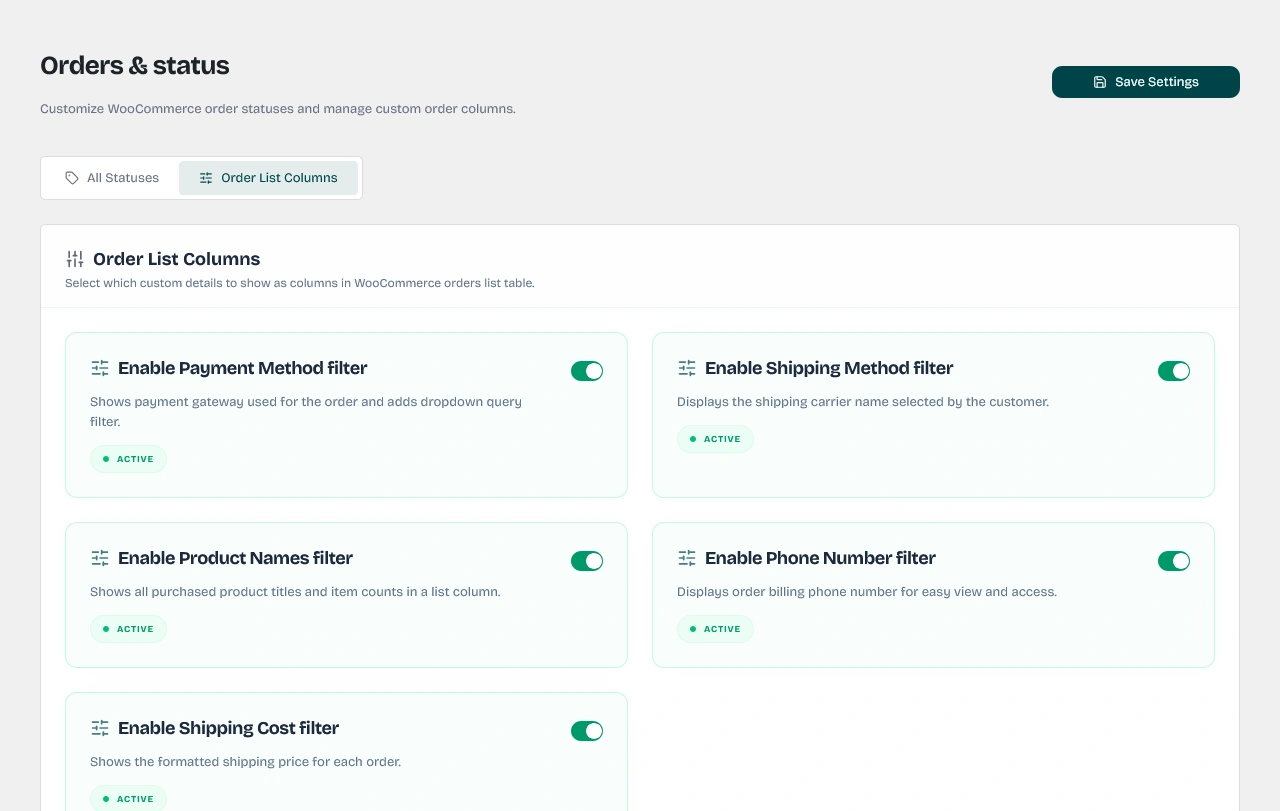
These columns provide immediate visibility into critical customer details:
| Column Key | Column Label | Technical Details & Visual Design |
|---|---|---|
wawp_payment_method | Payment Method | Pulls the active gateway title (e.g., Stripe Credit Card, PayPal, Cash on Delivery). |
wawp_shipping_method | Shipping Method | Displays the shipping provider selected by the buyer at checkout. |
wawp_product_names | Product Names | Lists all products inside the order along with their quantities formatted in a clean layout (e.g., Classic Tee (x1), Canvas Shoes (x2)). |
wawp_phone_number | Phone Number | Parses the number via Google's libphonenumber library. It automatically displays the customer's national emoji flag and appends a green WhatsApp Verified badge or red Unverified warning indicator (available for registered users). |
wawp_shipping_cost | Shipping Cost | Renders the exact shipping cost formatted in the order's active currency. |
wawp_resend_notif | Notification | Lists quick-action row buttons for WhatsApp Web, WhatsApp Meta, or Email. Pressing a button dispatches an AJAX request to resend the status notification instantly without reloading the page. If no rules are configured for the order status, displays a clean No active rules notice. |
Note on Option Naming: In the Wawp dashboard, these toggles are labeled as "Enable [Feature] Filter" (e.g., Enable Shipping Method Filter). In the database, they correspond to filter_ keys. Toggling them enables the corresponding column in the WooCommerce table. For the Payment Method toggle, it enables both the custom column and a functional dropdown filter above the table.
Filtering by Payment Method
Enabling the Payment Method filter registers interactive dropdowns above your orders list. The customizer handles the filter requests dynamically:
- Legacy Post-Type Screen: Hooks into the
requestfilter to inject custommeta_queryparameters targeting the_payment_methoddatabase key. - Modern HPOS Screen: Hooks into
woocommerce_order_list_table_prepare_items_query_argsto pass high-performance query arguments natively.

Part 3: Customizing Standard Default Statuses
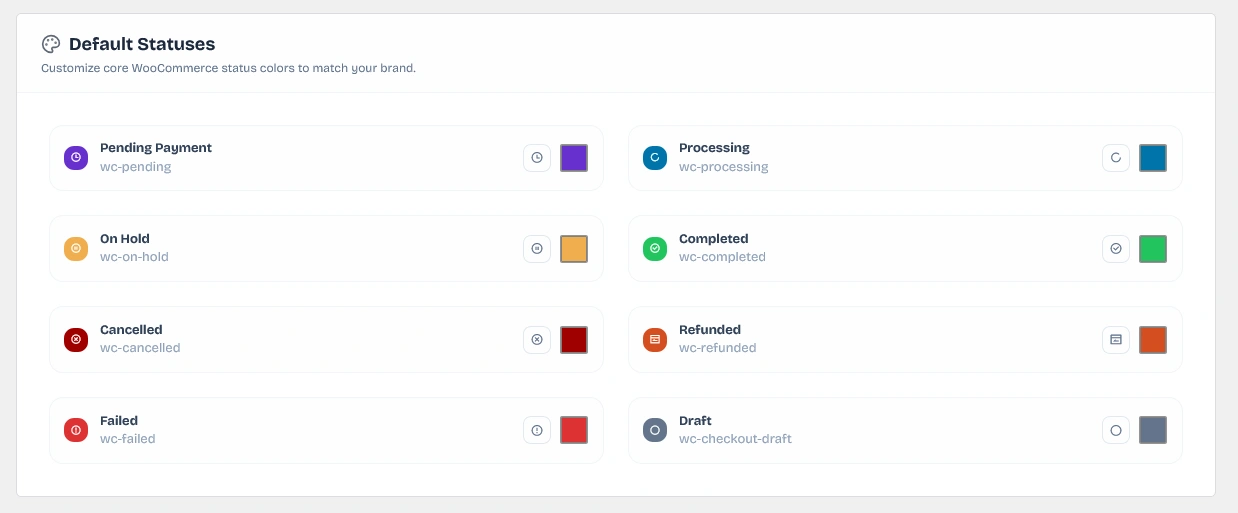
Beyond creating entirely new custom order states, Wawp allows you to re-style and re-colorize WooCommerce's default statuses (Pending, Processing, On Hold, Completed, Cancelled, Refunded, Failed, and Draft):
- Dashboard Overrides: Under the Default Statuses configuration panel, you can customize standard statuses, select new Remix Icons, and assign fresh brand colors.
- Unified Design Theme: When overrides are saved, Wawp hooks into
output_admin_styles()to build matching CSS badges for the default states. This transforms standard WooCommerce list rows to share the same modern pastel pill theme as your new custom states.
Part 4: Sending Manual Notifications from the Order Screen
When editing a specific order (such as /wp-admin/admin.php?page=wc-orders&action=edit&id=XXXX), the Wawp plugin loads the dedicated Wawp Actions metabox.
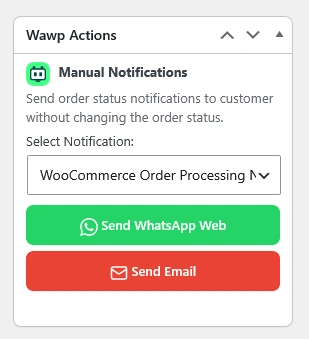
1. Top-Level Priority Placement
To keep your management workflow efficient, Wawp hooks into the add_meta_boxes action at priority 0 (before almost all other plugins). It hooks into both the legacy shop_order screen and the modern woocommerce_page_wc-orders screen.
It registers a filter (get_user_option_meta-box-order) to aggressively rearrange the sidebars, utilizing array_unshift to push the Wawp Actions metabox to the absolute top of the side column.
2. Dynamic Option Selection & Visibility
The metabox reads the current status of the open order. It searches your Wawp dashboard rules and compiles a dropdown selection listing only the active notification rules designed for this exact order status.
Using custom data attributes (data-wa-web, data-wa-meta, data-email), a responsive jQuery script tracks changes in the dropdown selection. It dynamically hides or displays the corresponding gateway buttons (WhatsApp Web, WhatsApp Meta, and/or Email) along with their official branding icons.
3. Behind-the-Scenes Execution
When a store manager clicks one of the manual dispatch buttons, Wawp initiates a secure AJAX request (wawp_send_manual_notification):
- Security Verification: Verifies the cryptographic token (
wawp_order_actions_nonce) and validates that the current user has themanage_woocommercecapability. - Shortcode Replacement: Extracts the order object and builds a massive translation payload (
replacements_user). It automatically substitutes placeholders like{{order_id}},{{customer_name}},{{order_total}},{{sitename}}, and{{status}}with live database values. - Gateway Overrides: The plugin forces the delivery channel based on the button clicked by the manager. If the "Send Email" button is clicked, it overrides the rule settings, converts the WhatsApp message body to the email body format, and dispatches the payload via your SMTP SMTP settings.
- Synchronous Immediate Delivery: While standard notifications may use queues, manual actions bypass all latency rules. Wawp sets the delivery timing to
instant, sending the message immediately to provide real-time success or failure feedback directly within the metabox. - Detailed Activity Audits: All manually triggered dispatches are logged in your central Wawp Activity Logs with a distinct title format:
Manual Notification Request (Order #XXXX). This allows you to easily audit manually sent test messages or customer requests separately from automated triggers.
Manual Send Benefit: The manual Actions metabox allows you to follow up with customers, send reminders, or resend invoice receipts at any point in the fulfillment cycle without needing to toggle or alter the actual order status itself.
Did this page help you?
100% found this article helpful (0 likes)
Related Articles
Best WooCommerce WhatsApp Plugin: Ultimate E-Commerce Automation Guide
Discover the best WooCommerce WhatsApp plugin to secure and automate your store. Learn about order notifications, abandoned cart recovery, and checkout OTPs.
How to Setup Automated Notifications
Configure dynamic triggered notification messages automatically driven by WooCommerce order state transitions, subscriptions, or WordPress account events.
How to Setup Checkout Verification
Secure your WooCommerce store transactions utilizing robust WhatsApp OTP, Firebase SMS, or Email confirmations to prevent fraud.
- Need help? Contact Support.
- Check out our Changelog.
- Join our Facebook Community.
- LLM? Read llms.txt.
OFFER ENDS SOON
Extra 30% OFF All Plans
Use this exclusive promo code at checkout to enjoy an extra 30% discount on top of current sales!
BOOST30