If you have purchased Wawp Pro or downloaded the Wawp Login Free package from our portal, this guide covers installing the full plugin by first uploading the lightweight Wawp Remote Updater, then letting it download and activate the latest version automatically. You can also use the same Updater to update Wawp later.
Installing and Updating the Wawp Pro Plugin
Learn how to install and update Wawp Pro or Wawp Login Free using the lightweight Wawp Remote Updater downloaded from the official Wawp download page.
3 min read·Updated August 23, 2026

1. Installing Wawp Pro / Wawp Login Free via the Wawp Remote Updater
To begin installing the professional version of Wawp, visit our official download page. You can download the full plugin and upload it to your site, or—faster and easier—simply upload the Wawp Remote Updater, which is under 50 KB in size. The Updater will install the full plugin directly and can also update it later.
1
Download the Updater Download the Wawp plugin or the lightweight Remote Updater from the[official Wawp download page](https://wawp.net/en/download).
2
Open Plugins > Add New Go to your WordPress admin dashboard, navigate to Plugins, and click Add New Plugin.
3
Upload the Updater Click Upload Plugin at the top of the page, choose the downloaded Updater ZIP file, and click Install Now.
4
Install the Full Version Once the Updater plugin is active, open the Wawp Updater page. Click the Install button for the latest version at the top of the list.
5
Confirm and Finish A confirmation dialog will appear. Click Confirm and Install. Within moments, the full professional version of Wawp will be downloaded and automatically activated, and you will be redirected to the Wawp dashboard to start using it.
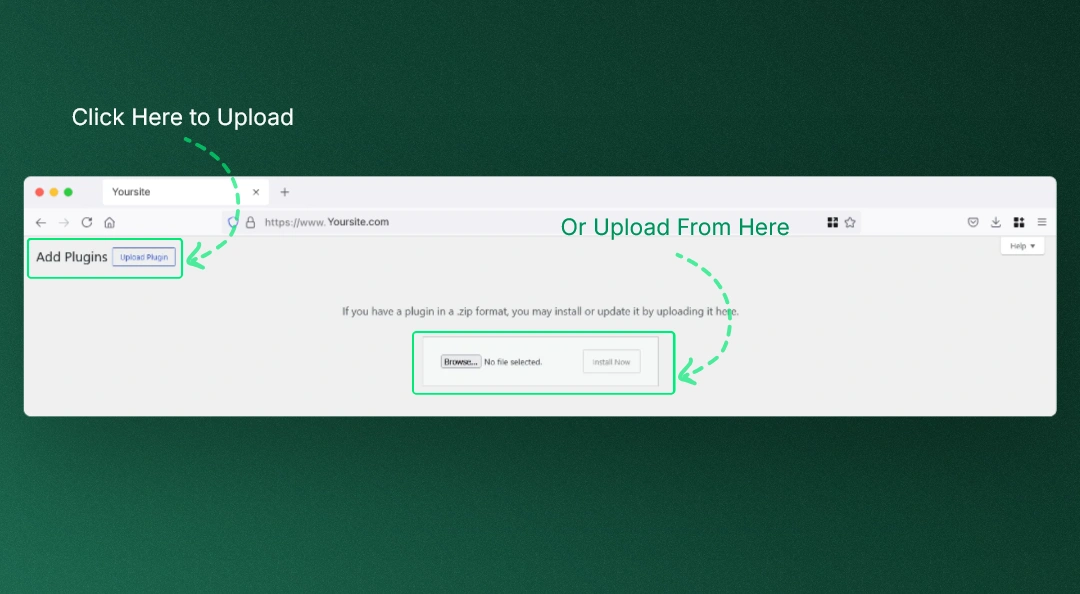
Interface for uploading the Wawp Updater ZIP file directly through the WordPress admin area.
Keywords: upload wordpress plugin, install from zip, manual installation2. Wawp Updater Dashboard (Update & Install Management)
Starting from version 5.0, Wawp includes a dedicated, highly advanced Wawp Updater Dashboard designed to handle all your local and remote update dispatches securely and seamlessly. This interface is accessible at: /wp-admin/admin.php?page=wawp-updater.
Key Features & Specifications:
- One-Click Local Updates: Easily download and unpack the latest version of Wawp Pro directly from your dashboard using our highly reliable
Download + Unzipprocess. This completely eliminates permissions errors and outdated caches. - Remote Support Key Management: Displays your unique
wawp_sso_shared_key. Saving this key inside yourapp.wawp.netconsole permits secure, automated remote update triggers for both the Wawp plugin and WordPress core. - Complete Audit Trail (Update Logs): Keeps a strict in-database log of the last 50 update requests. Each log entry tracks whether the update was for the plugin or WordPress core, the target version, status (success/failure), execution timestamp, client IP address, and User Agent of the initiating request.
- End-to-End Encryption & Security: Rest assured that all incoming update triggers require cryptographic API token verification (
x-api-key) and are enforced strictly over secure HTTPS/TLS 1.2+ channels to block man-in-the-middle exploits. - Smart Rate Limiting: The system implements an automatic rate limiting cap (maximum of 3 requests per minute per domain) to prevent server overload or malicious request abuse.
Developer Pro-Tip: After performing any major version update, we highly recommend disabling and then re-enabling the plugin once. This ensures that any updated database migrations, database schema updates, or configuration adjustments compile perfectly.
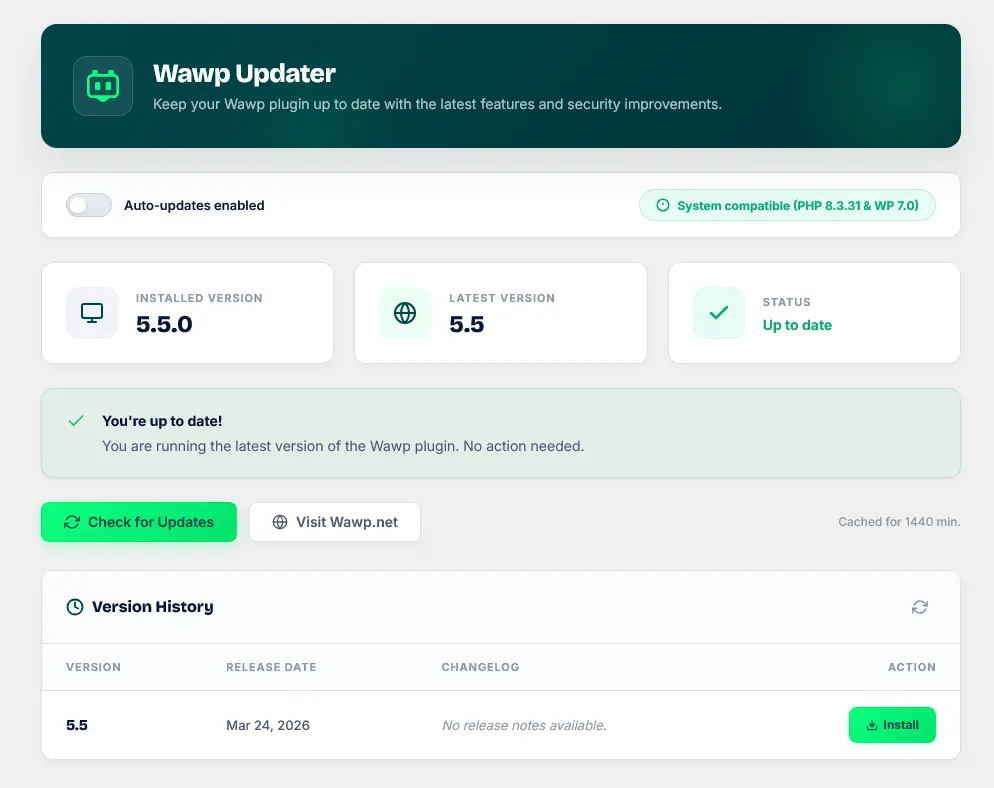
The Wawp Updater interface in the WordPress admin panel, displaying available updates, remote support key settings, and comprehensive execution logs.
Keywords: wawp updater dashboard, remote support key, update logs, one-click updateNext Steps
Now that you have successfully installed Wawp on your WordPress site, we highly recommend reading our Wawp Onboarding & Setup Wizard Guide to link your account and configure your initial automation triggers.
Previous
Best WhatsApp WordPress Plugin: Complete Linking & Automation Guide
NextWawp Onboarding & Setup Wizard Guide
Did this page help you?
100% found this article helpful (0 likes)
Related Articles
Best WhatsApp WordPress Plugin: Complete Linking & Automation Guide
Discover the best WhatsApp WordPress plugin and fully automate your store. Learn about notification dispatches, signup verification OTP forms, and advanced country codes.
Wawp Onboarding & Setup Wizard Guide
A complete step-by-step walkthrough of the Wawp onboarding setup wizard, explaining account authentication, channel synchronization, diagnostics, and migration paths.
About Wawp Plugin Dashboard
The Wawp Plugin Dashboard serves as your centralized hub, allowing you to monitor system health, check user snapshots, and control all advanced engagement and security features.
- Need help? Contact Support.
- Check out our Changelog.
- Join our Facebook Community.
- LLM? Read llms.txt.
OFFER ENDS SOON
Extra 30% OFF All Plans
Use this exclusive promo code at checkout to enjoy an extra 30% discount on top of current sales!
BOOST30