This custom form builder gives you full control over user data and details how to setup chat verification using WhatsApp OTP, Firebase SMS, or secure email passcodes.
How to Setup Registration Form & Chat Verification
Learn how to setup chat verification and customize your signup form builder. Enforce mandatory user identity checks via WhatsApp OTP, Firebase SMS, or Email.
8 min read·Updated August 23, 2026

USER ACQUISITIONBUSINESS IMPACT & ROI
Guaranteed Lead Authenticity: Requiring instant mobile OTP verification during user registration ensures 95% lead authenticity and reduces fake database signups by 90% (HubSpot Acquisition study). Optimized Marketing Target: Validating active communication endpoints drops fake profiles by 80%, saving hours of manual cleanup and ensuring high-converting audience lists (Omnisend Marketing data).
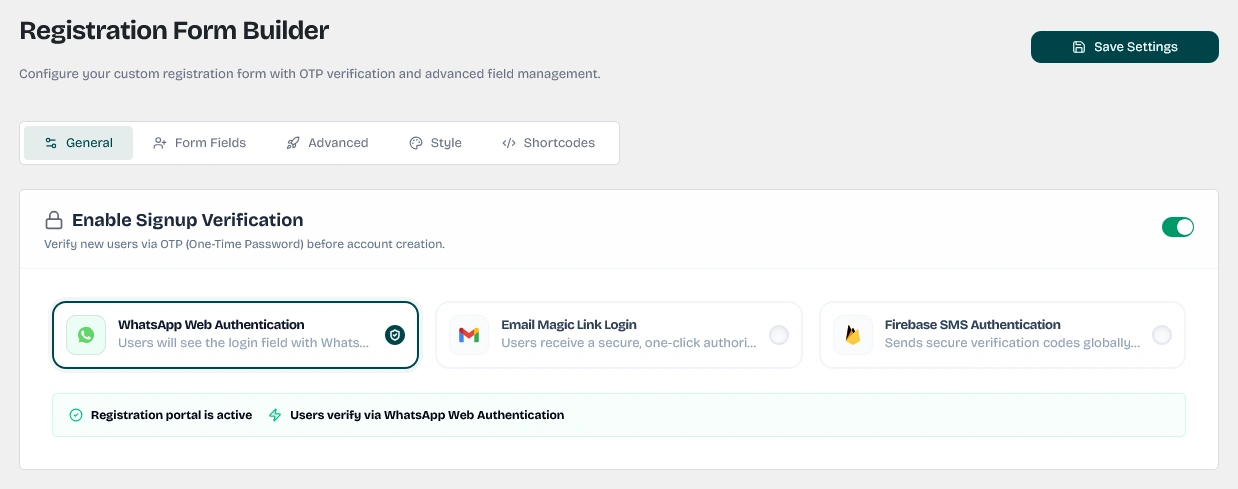
Main dashboard for configuring customer registration forms and authentication settings in WordPress.
Keywords: wordpress registration form, user management, wawp signup setup1. General & Verification Settings
Ensure clean customer acquisitions by enforcing mandatory verification protocols on new user signups.

Settings to toggle mandatory OTP verification for new customer signups to prevent fake accounts.
Keywords: signup verification, otp registration, account security- Enable Signup Verification: Turn this on to prompt newly registering users to verify their identities via a One-Time Passcode (OTP). If disabled, registrations are completed instantly without checks. Enabling this prevents ghost users and spam registrations.
- Verification Method: Choose the primary verification carrier:
- WhatsApp Web: Relays passcodes dynamically via WhatsApp.
- Firebase SMS: Delivers codes via SMS (requires active Firebase Connector configurations).
- Email OTP: Delivers passcodes via email.
- Verification Fallback: Allow users to verify via email if the primary WhatsApp OTP delivery fails, preventing user drop-offs.
- Choose WhatsApp Sender: If you have multiple WhatsApp instances/numbers connected to your account, select exactly which active sender number to use to deliver registration OTPs from this dropdown.

Dropdown selector for choosing the primary OTP delivery channel: WhatsApp, Firebase SMS, or Email.
Keywords: verification method, otp channel, whatsapp sms email verificationAllow Email Fallback: Turn this toggle on to automatically allow users to verify their accounts via email if the primary WhatsApp OTP delivery fails, preventing user drop-offs.
2. OTP Template & Email Customizations
Personalize the outgoing notification content sent to users during signups:
- WhatsApp OTP message template: Define the message structure, ensuring you preserve the
{{otp}}placeholder tag to transmit the passcode. - Email Subject: Enter a custom email subject line (e.g. Verification Code from {{site_name}}).
- Email HTML Template: Select one of your beautifully designed Email HTML Templates from the dropdown menu to deliver branded, professional emails instead of default plain text.
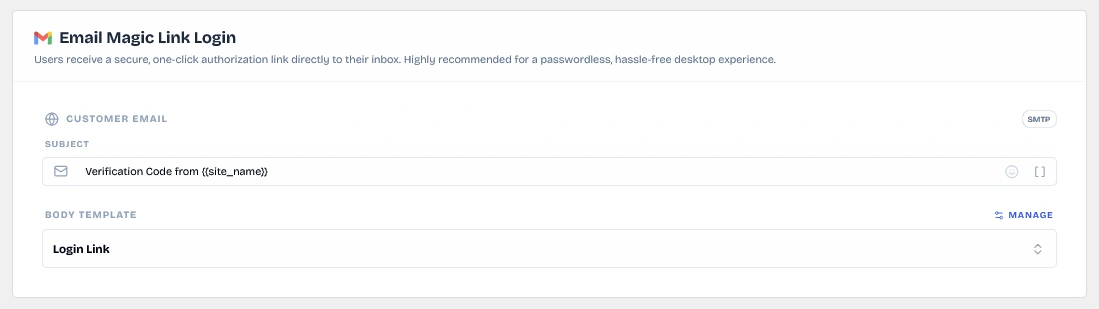
Configuration panel for setting up email-based magic link login and OTP delivery templates.
Keywords: email magic link, email otp, login verification email3. Advanced WhatsApp Authentication Engine
If you select WhatsApp as your verification method, you can unlock modern delivery layouts:
- Preferred Verification Channel:
- Standard OTP: Sends a secure 6-digit text passcode that the user manually enters on your site.
- Interactive List (One-Tap Verify): Sends a premium interactive template message on WhatsApp. Instead of copy-pasting codes, users simply tap Approve Signup (to instantly complete registration) or Reject & Stop (to cancel) directly inside WhatsApp.
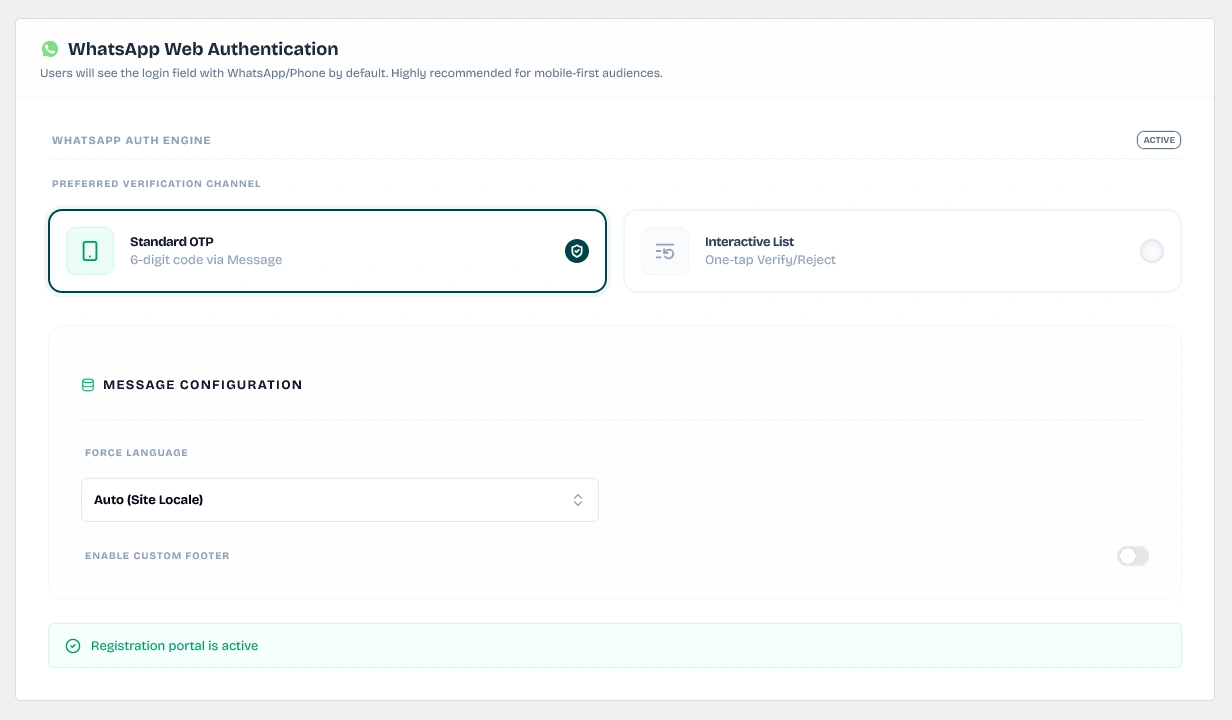
Configuration panel for standard 6-digit OTP delivery via WhatsApp for user verification.
Keywords: whatsapp otp, standard otp verification, 6 digit code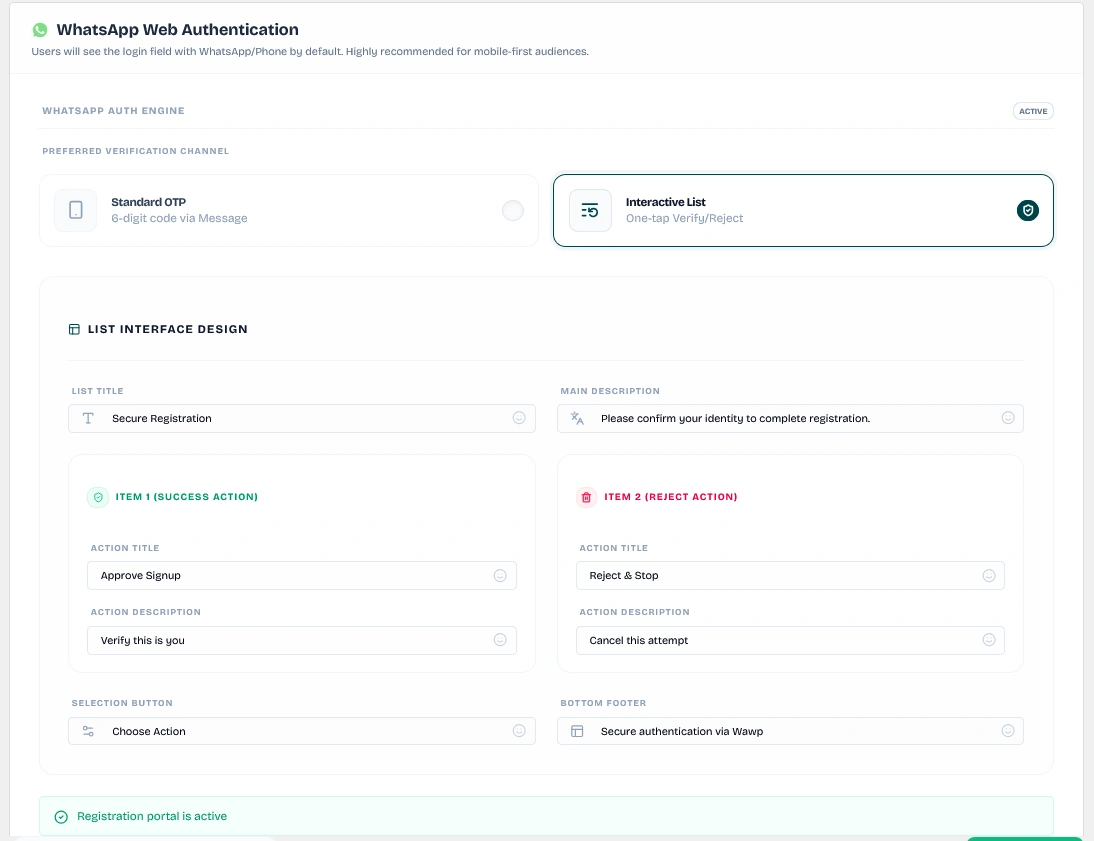
WhatsApp interactive list message template allowing users to approve or reject signup with a single tap.
Keywords: whatsapp interactive list, one-tap verify, approve signupCustomizing Interactive Lists:
You have complete control over the layout of the WhatsApp interactive message template:
- List Title: e.g., Secure Registration
- Main Description: e.g., Please confirm your identity to complete registration.
- Selection Button Label: e.g., Choose Action
- Bottom Footer: e.g., Secure authentication via Wawp
- Success Action (Item 1) Title & Description: e.g., Approve Signup - Verify this is you
- Reject Action (Item 2) Title & Description: e.g., Reject & Stop - Cancel this attempt
Message Settings & Formatting:
- Force Language: Set whether WhatsApp messages automatically follow the WordPress site language or force a specific custom language (e.g. English, Arabic).
- Enable Custom Footer: Include custom footer text at the bottom of the WhatsApp OTP text message template.
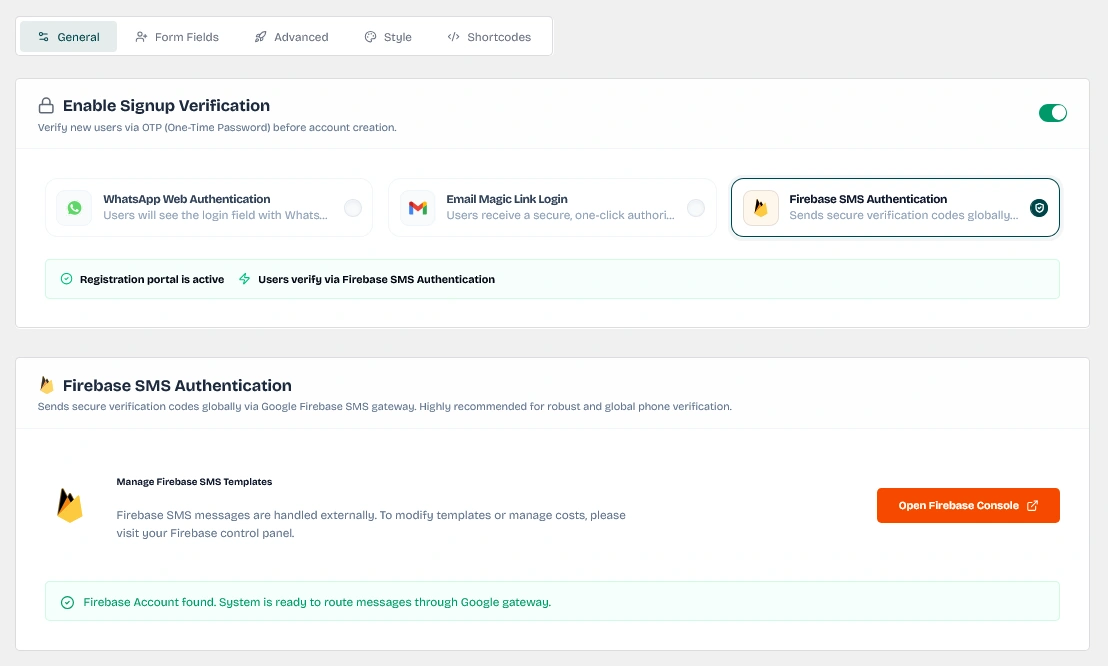
Configuration panel for Firebase SMS OTP delivery, requiring active Firebase Connector integration.
Keywords: firebase sms, sms otp, firebase authentication wordpress4. Standard & Custom Form Field Builder
Customize the fields presented to users and structure your form:
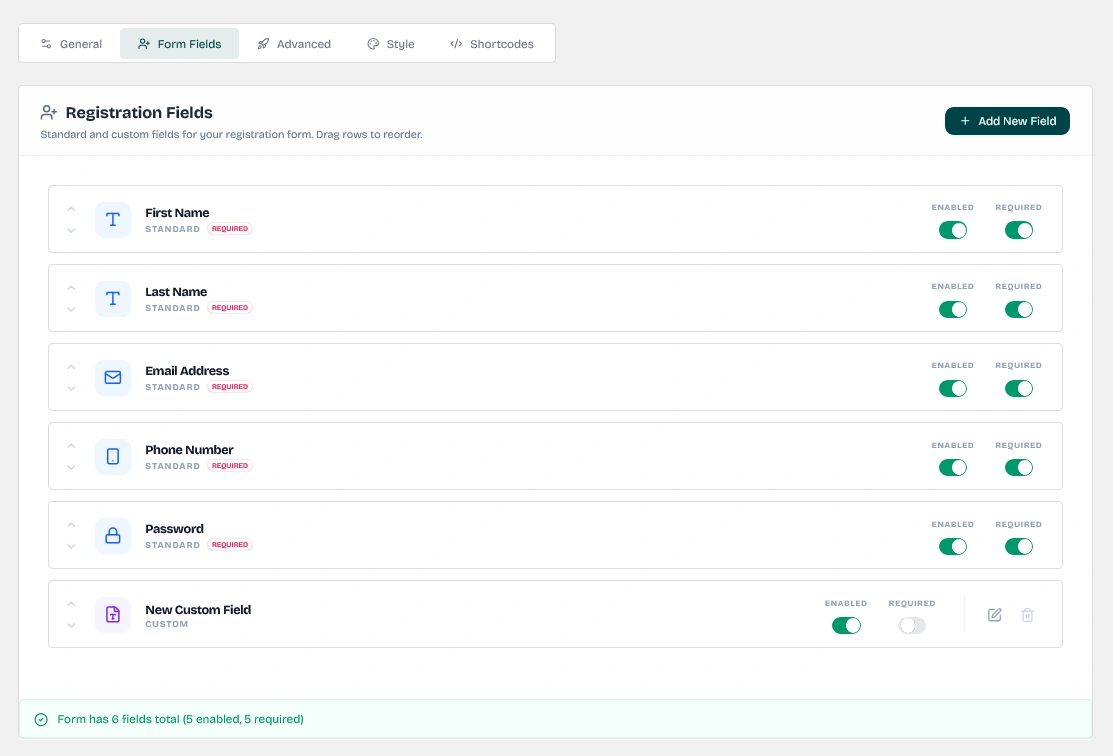
Managing default WordPress user fields like name and email within the Wawp registration form.
Keywords: standard signup fields, wordpress user meta, form customizationStandard Fields:
You can toggle the visibility (Enabled) and mandatory status (Required) of core WordPress fields:
- First & Last Name: Syncs into native WordPress user meta fields.
- Email: Natively bound to user accounts.
- Phone Number: Registered into
awp_phonemetadata and synced into WooCommercebilling_phonefields. - Password: Allow users to choose their password.
Drag-and-Drop Reordering: Standard and custom fields are presented in a drag-and-drop editor. Simply drag rows to reorder how the inputs appear to users on the frontend registration form.
Add New Custom Fields:
Add specialized input fields tailored for your custom data requirements:
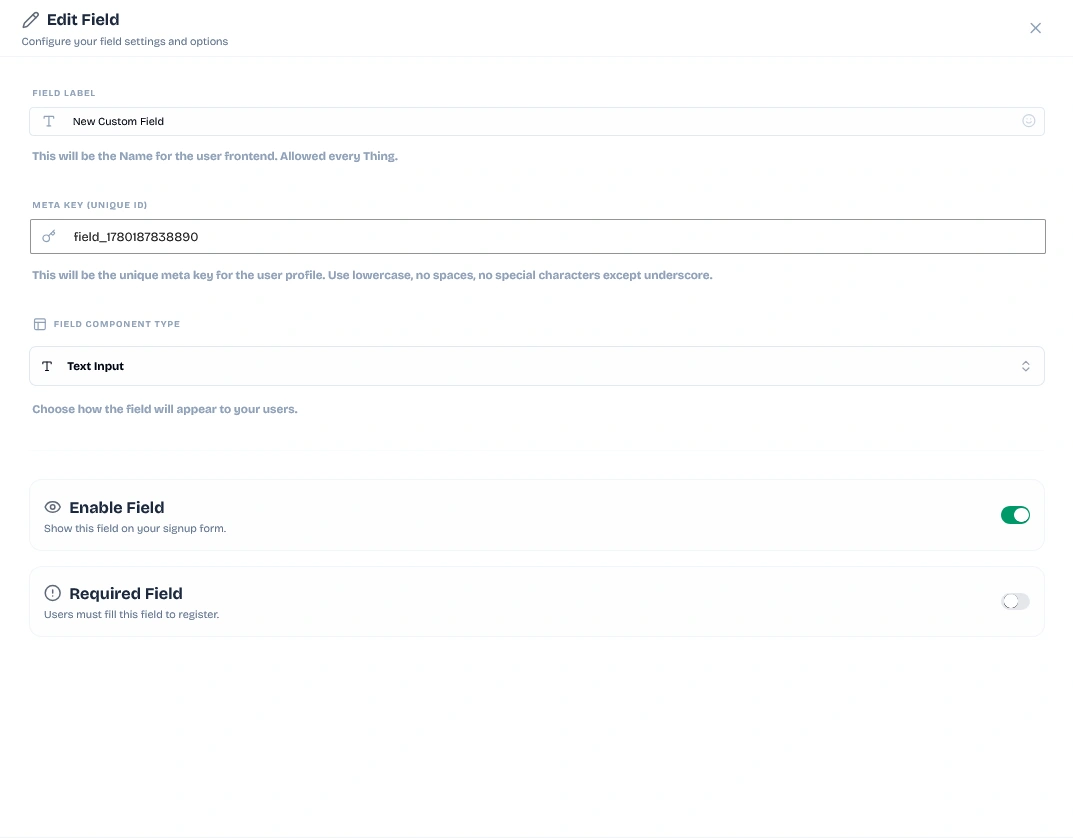
Interface for creating additional data fields to collect specialized information from customers.
Keywords: custom registration fields, wordpress meta data, advanced form builder- Meta Key (Unique ID): Define a unique meta key identifier (e.g.
billing_company). Use lowercase, no spaces or special characters except underscores. - Field Label: The label displayed to users on the frontend.
- Field Component Type: Choose from 6 input types: Text Input, Text Area, Email Input, Number Input, Checkbox Group, or Radio Selection.
- Bulk Option Customizer: For checkbox and radio fields, select Bulk Mode and enter options line-by-line formatted as
Option Label|Option Value(e.g. Enterprise Customer|enterprise).
WP Admin Profile Integration: Custom field data is seamlessly synced into the WordPress User Profile and rendered under the custom section "Additional Profile Information" inside the WP admin dashboard.
5. Advanced Protocols
Dictate post-registration behavior and secure account setups:
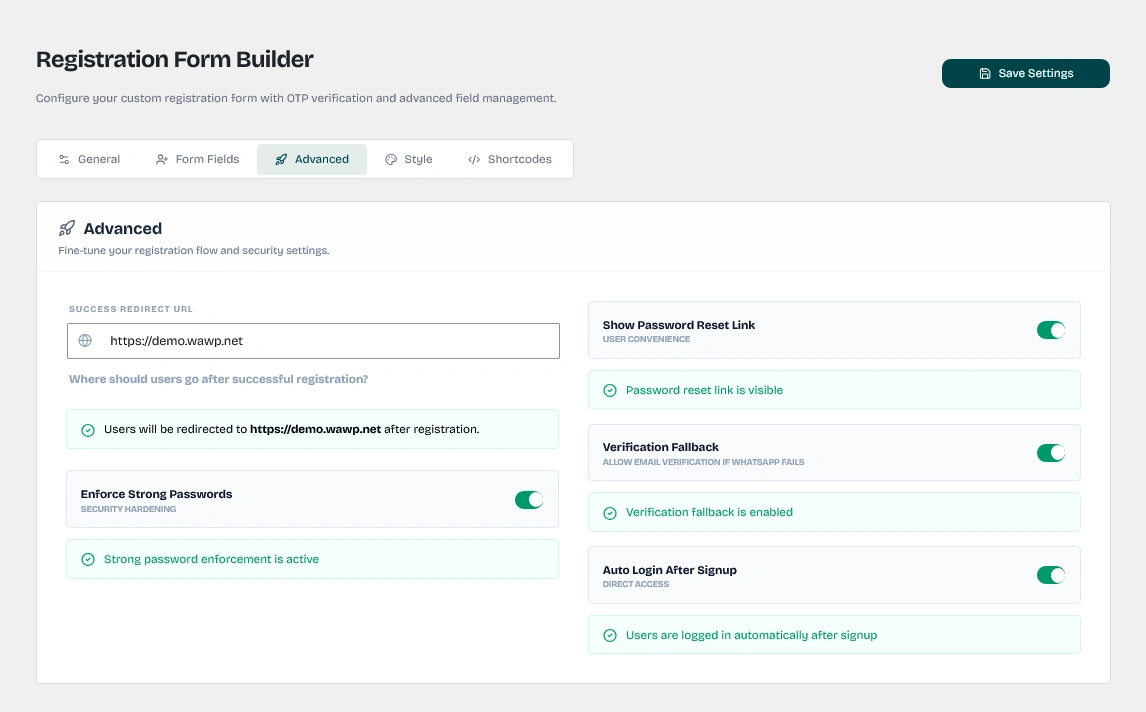
Configuring automatic user redirects and auto-login behavior after successful account creation.
Keywords: registration redirect, auto-login wordpress, post-signup flow- Success Redirect URL: Route users to a custom landing page or WooCommerce dashboard after successful registration.
- Enforce Strong Passwords: Triggers complex password requirements (uppercase, numbers, special characters, minimum 8 characters).
- Show Password Reset Link: Automatically email or WhatsApp a password reset link to new users so they can set a password securely after registration.
- Auto-login After Signup: Automatically establish active, logged-in sessions for users immediately upon registration.
6. Visual Customization & Styling
Adapt form aesthetics to match your brand identity:
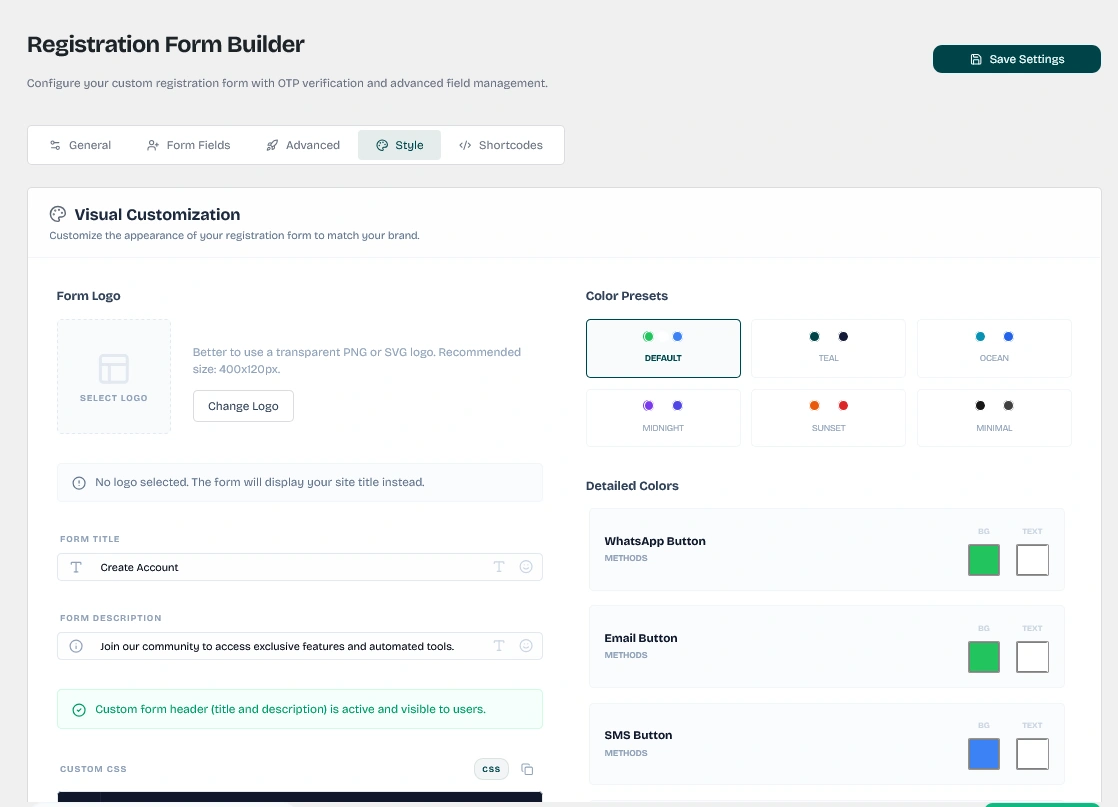
Customization tools for adjusting colors, borders, and typography to match your site's theme.
Keywords: registration form design, custom css forms, branded signup-
Enable Premium Design: Activate this toggle to apply advanced brand styling.
-
Brand Customization: Customize the welcoming headers and upload your logo.
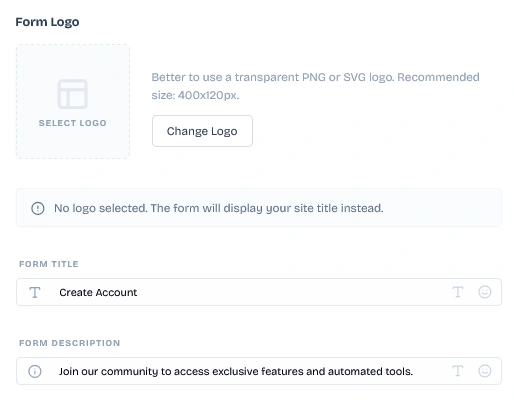
Upload a logo and customize the form title and description to match your brand identity.
Keywords: form logo, brand customization, registration form branding- Color Presets: Select from six pre-designed color presets: Default (WhatsApp Green), Teal, Ocean Blue, Midnight, Sunset, or Minimal.
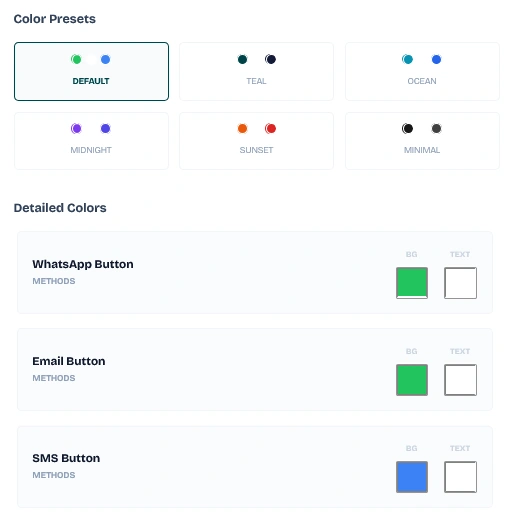
Six pre-designed color presets including WhatsApp Green, Teal, Ocean Blue, Midnight, Sunset, and Minimal.
Keywords: color presets, form theme, registration form colors- Detailed Colors Customizer: Manually override the button background and text colors for: WhatsApp Button, Email Button, Firebase/SMS Button, Signup Button, and Verify Button.
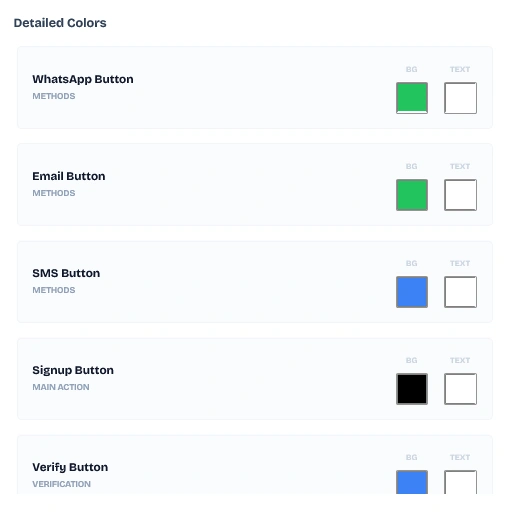
Fine-grained color controls for each button type: WhatsApp, Email, Firebase, Signup, and Verify buttons.
Keywords: button colors, custom colors, form button styling- Custom CSS: Enter custom CSS rules to override default layouts.
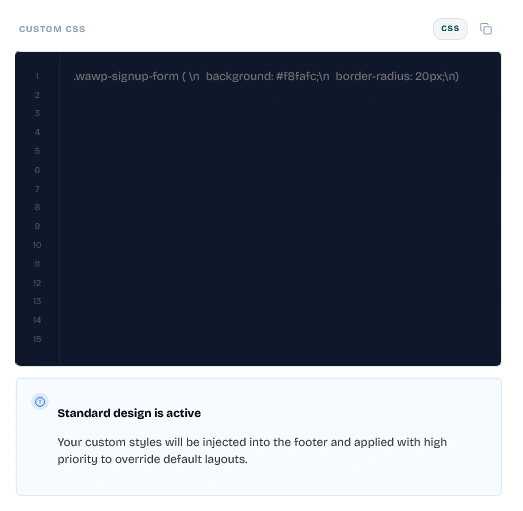
Built-in CSS editor for advanced layout overrides and fine-tuned visual adjustments to the registration form.
Keywords: custom css, form styling, advanced design7. Form Embedding & Integration
Deploy your registration forms anywhere on your website:
- Main Shortcode: Embed the complete registration form on any page, post, or widget area using
[wawp_signup_form]. - Additional Shortcodes: Appends custom shortcodes (like Google reCAPTCHA) immediately before or after the registration form elements.
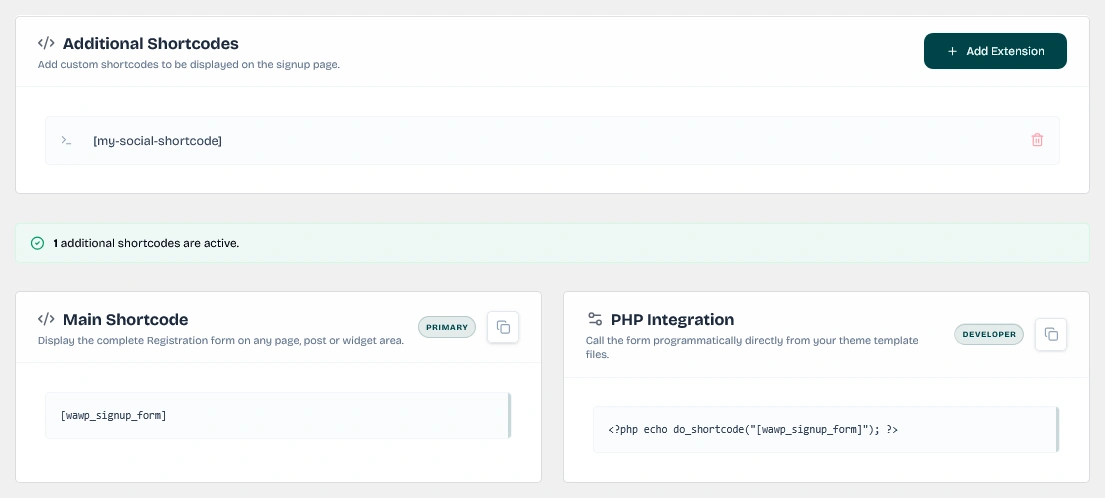
Panel for inserting extra shortcodes such as reCAPTCHA before or after the main registration form.
Keywords: registration shortcodes, recaptcha integration, extra form elementsPHP Integration
Programmatically call the signup form directly inside your theme template files:
if ( class_exists( 'WAWP_Signup' ) ) {
    echo WAWP_Signup::get_instance()->render_signup_form();
}
Did this page help you?
100% found this article helpful (284 likes)
Related Articles
How to setup Advanced Country Code
The advanced country code feature allows you to automatically correct your customer numbers according to their country code so that your website can send messages correctly.
How to Setup Passwordless Login (Login by OTP)
Passwordless Login provides frictionless access using WhatsApp OTP, Email Magic Links, or Firebase SMS, speeding up return customer conversions.
About Authentication Pages Settings
Configure secure WordPress WhatsApp authentication page settings. Learn to set up custom login redirection rules, replace default login pages, and automate signup routing via Wawp.
- Need help? Contact Support.
- Check out our Changelog.
- Join our Facebook Community.
- LLM? Read llms.txt.
OFFER ENDS SOON
Extra 30% OFF All Plans
Use this exclusive promo code at checkout to enjoy an extra 30% discount on top of current sales!
BOOST30