The Passwordless Login feature provides your customers with frictionless access without the stress of remembering traditional, complex passwords. This dramatically speeds up return customer conversions and secures logins via single-use secure codes or interactive WhatsApp templates.
How to Setup Passwordless Login (Login by OTP)
Passwordless Login provides frictionless access using WhatsApp OTP, Email Magic Links, or Firebase SMS, speeding up return customer conversions.
11 min read·Updated August 23, 2026

CONVERSION IMPACTBUSINESS IMPACT & ROI
Frictionless Conversion Lift: Passwordless sign-ins achieve a 98% success rate vs. only 32% for traditional passwords — and are 3× faster — making return customer logins seamless and reducing checkout drop-offs (Microsoft official passkey benchmarks). Slash Support Overhead: Password reset and recovery requests account for 30% to 50% of all IT help desk call volume. Implementing passwordless OTP gateways eliminates this overhead entirely, cutting account-related support costs by up to 50% (Gartner IAM research).
1. General Settings (Default Method & Session Security)
Configure the landing state of your login form and define secure session lifetimes for authenticated users.
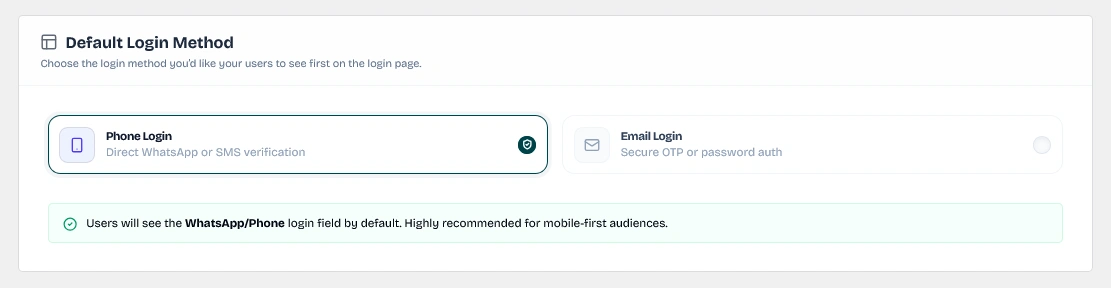
Configure the default landing tab (Phone Login or Email Login) that users see first.
Keywords: default login method, landing method, phone login, email loginDefault Login Method (login_method)
Choose the landing tab users see first when opening the form:
- Phone Login (
phone_login): Direct WhatsApp or SMS verification. Recommended for mobile-first audiences. - Email Login (
email_login): Secure Email Magic Link or password authentication. - Auto-Fallback: If the chosen default method is not available due to misconfigured gateways or disconnections (e.g., Phone Login is selected but both WhatsApp and Firebase gateways are offline), the system automatically renders the alternative tab instead.
Security & Session
- Session Lifetime Type (
session_lifetime_type): Control user session duration. Select Lifetime (Follow WordPress) to inherit standard 14-day login cookies, or choose a custom duration in Minutes, Hours, or Days. - Lifetime Value (
session_lifetime_value): Set the exact number of units for custom timeframe expirations. Only visible and customizable when the lifetime type is set to Minutes, Hours, or Days. Setting this to0falls back to the WordPress default duration.
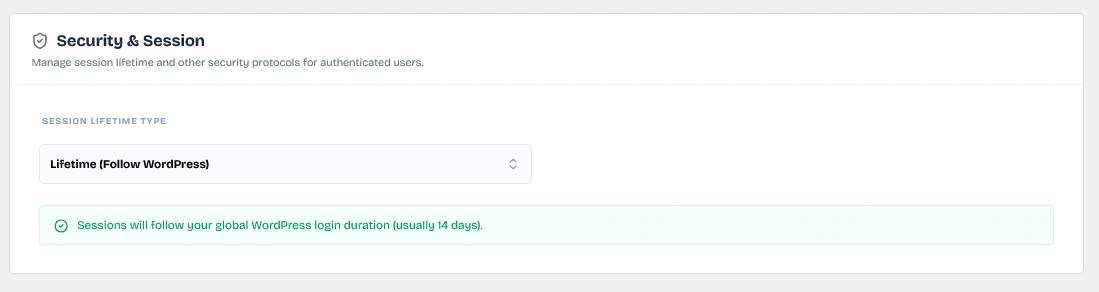
Configure user session lifetimes based on WordPress default cookies or custom durations (minutes, hours, days).
Keywords: session security, custom cookie duration, wordpress session lifetime2. Email Login Settings (Magic Link vs. Classic Password)
Decide how email authentications are routed and personalize the email delivery templates.
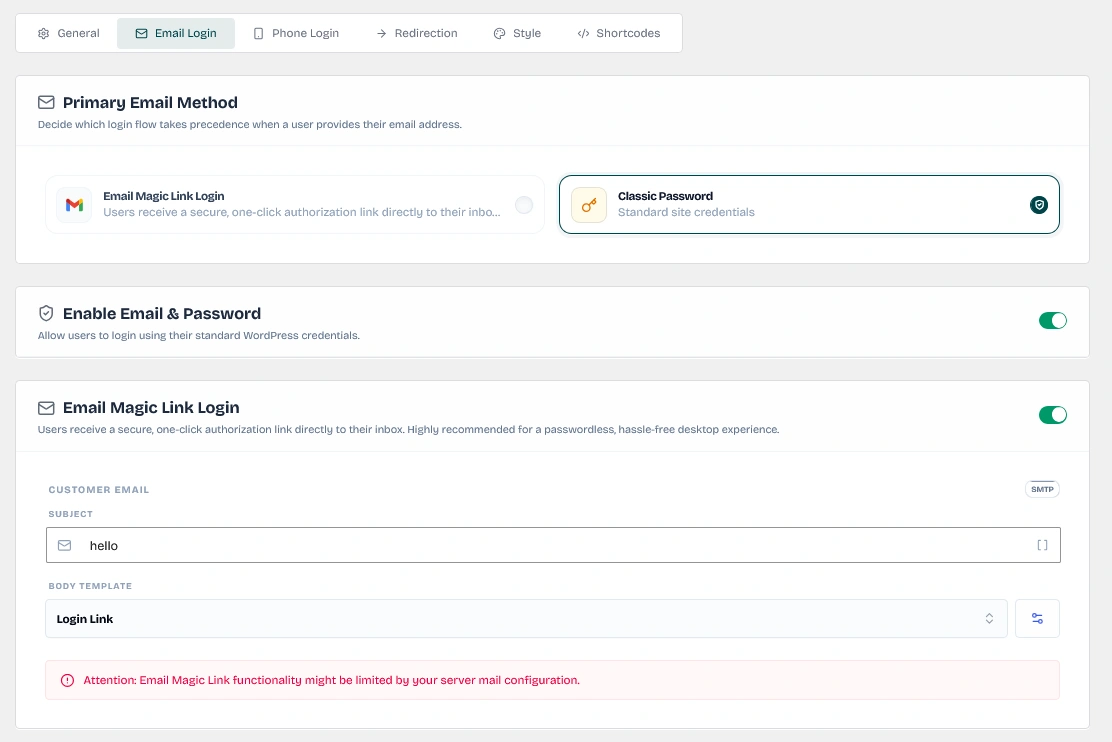
Main configuration area for configuring all email-based authentication options.
Keywords: email login overview, magic link email settingsPrimary Email Method (primary_email_method)
Select which flow takes precedence when a user enters an email address:
- Email Magic Link Login (
otp): Delivers a secure click-to-login link directly to their inbox. - Classic Password (
password): Standard username and password validation.

Determine whether Email Magic Link login or Classic Password validation takes precedence for email-based sign ins.
Keywords: primary email method, magic link vs password, email login selectorEnable Email & Password (enable_email_password)
Switch this toggle to allow users to authenticate using standard WordPress username/password credentials. This adds a password input field as an alternative sign-in method.

Turn on this toggle to allow users to sign in using their standard WordPress account password.
Keywords: enable email password, wordpress credentials login, bypass otpEmail Magic Link Login / Email OTP Login (enable_email)
Switch this toggle to enable passwordless magic link delivery:
- SMTP Gateway Dependency: This feature requires the Email Sender (SMTP) connection to be configured and active under Sender Settings (
/wp-admin/admin.php?page=wawp-senders#tab-email). If disabled, a warning badge is displayed and the toggle is deactivated. - Subject (
otp_subject_email): Enter a custom subject line (e.g., Sign in to {{shop_name}}). Supports personalization tags such as:{{magic_link}}— Generates the secure login link.{{user_name}}— Displays the user's account name.{{shop_name}}— Displays the store name.
- Body Template (
otp_email_template_id): Select one of your HTML templates from the dropdown. You can manage templates on the Email Templates page. Click the Manage Templates (Settings Gear) button next to the dropdown to go directly to/wp-admin/admin.php?page=wawp&wawp_section=email_templates. Supported placeholders inside the body template include:{{magic_link}}{{user_first_last_name}}{{shop_name}}{{site_link}}
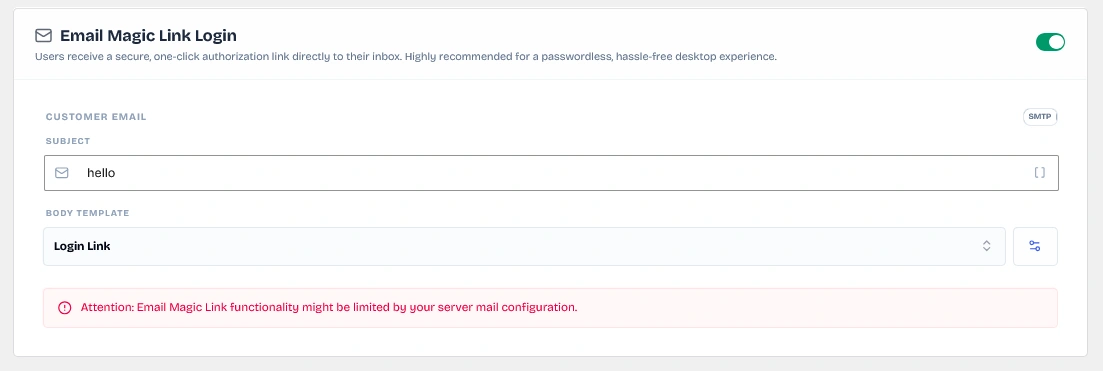
Configure Magic Link subjects, templates, and integration variables.
Keywords: email magic link customization, smtp templates, email login subject3. Phone Login Settings (WhatsApp vs. Firebase SMS)
Configure high-deliverability mobile channels to route verification codes or interactive approvals.
Primary Phone Method (primary_phone_method)
Select the default delivery gateway for phone numbers:
- WhatsApp Web Authentication (
whatsapp): Use your connected WhatsApp instances for standard OTP texts or one-tap verification list messages. - Firebase SMS Authentication (
firebase): Use Google Firebase API to send SMS codes globally.

Configure the default mobile delivery gateway (WhatsApp Web Authentication vs. Firebase SMS Authentication) for phone logins.
Keywords: primary phone method, whatsapp web authentication, firebase smsA. WhatsApp Web Authentication (enable_whatsapp)
Toggle this gateway to route logins via your WhatsApp connections. This requires at least one online WhatsApp instance under Sender Settings (/wp-admin/admin.php?page=wawp-senders). If no instances are online, the toggle is disabled and a warning is shown.
Preferred Verification Channel (whatsapp_auth_type)
Choose the verification workflow:
- Standard OTP (
otp): Sends a 6-digit text passcode that the user manually inputs on your site.- Force Language (
whatsapp_otp_lang_type):- Auto (Site Locale) (
site): Inherits the active WordPress site language. - User Context (Dynamic) (
user): Inherits the individual user's locale. - Forced (Manual Selection) (
custom): Locks the template to a fixed language.
- Auto (Site Locale) (
- Select Language (
whatsapp_otp_custom_lang): Only visible if Force Language is set to custom. Choose from Arabic, English, Spanish, French, Portuguese, Indonesian, Russian, Turkish, or German. - Enable Custom Footer (
whatsapp_otp_footer_enabled): Toggle to append custom text at the bottom of the OTP message. - Footer Content (
whatsapp_otp_footer): Input custom text with emoji support (e.g., Support Wawp Engine). - OTP Message Template (
otp_message_whatsapp): Edit the raw message content. Make sure to preserve the{{otp}}placeholder. Example: "Your verification code is {{otp}}".
- Force Language (
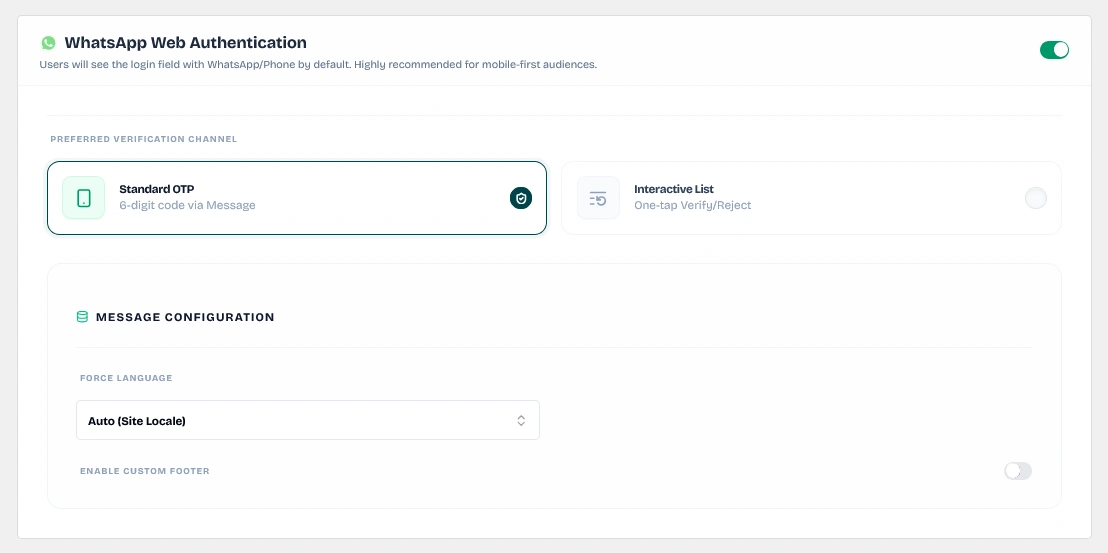
Configure template languages, custom footers, and code templates for the 6-digit WhatsApp OTP flow.
Keywords: whatsapp standard otp, custom footer message, forced language otp- Interactive List (One-Tap Verify) (
list): Sends an interactive message card directly on WhatsApp. The user simply taps Approve Login or Reject & Report without entering codes.- List Title (
whatsapp_list_title): Set a bold header for the WhatsApp message card (default: Secure Verification). - Main Description (
whatsapp_list_desc): Set the card subtitle (default: Verify your identity to continue). - Item 1 (Success Action): Customize the approval button details.
- Action Title (
whatsapp_list_item1): e.g., Approve Request. - Action Description (
whatsapp_list_item1_desc): e.g., This is my login attempt.
- Action Title (
- Item 2 (Reject Action): Customize the rejection button details.
- Action Title (
whatsapp_list_item2): e.g., Reject & Report. - Action Description (
whatsapp_list_item2_desc): e.g., I don't recognize this.
- Action Title (
- Selection Button (
whatsapp_list_button): Label for the dropdown option list (default: Choose Action). - Bottom Footer (
whatsapp_list_footer): Bottom footer note (default: Secure authentication via Wawp).
- List Title (
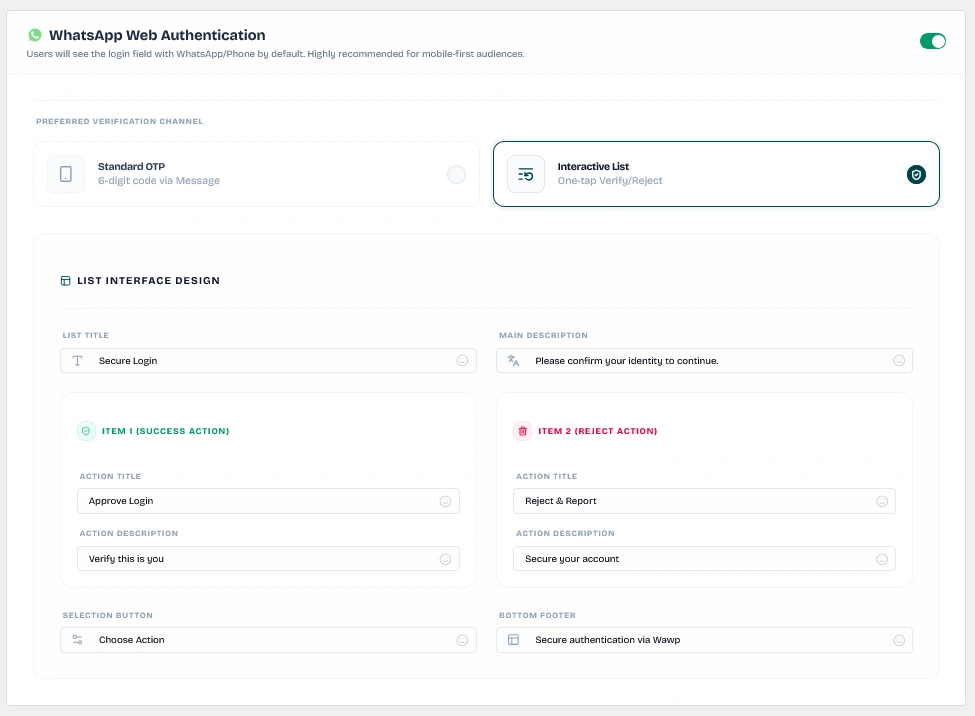
Design custom approval buttons, rejection button actions, descriptions, list headers, and bottom footer notes.
Keywords: interactive list whatsapp, tap to approve login, reject button configB. Firebase SMS Authentication (enable_firebase_sms)
Toggle this gateway to route verification codes via SMS.
- Firebase Configuration Dependency: Requires Firebase API Key and configuration settings to be active under Sender Settings -> Firebase (
/wp-admin/admin.php?page=wawp-senders#tab-firebase). If missing, an error badge is displayed. - External Management: Firebase SMS messages are handled externally. To modify templates or manage costs, visit your Google Firebase Console. To set up Firebase credentials, follow the Firebase SMS Configuration Guide.
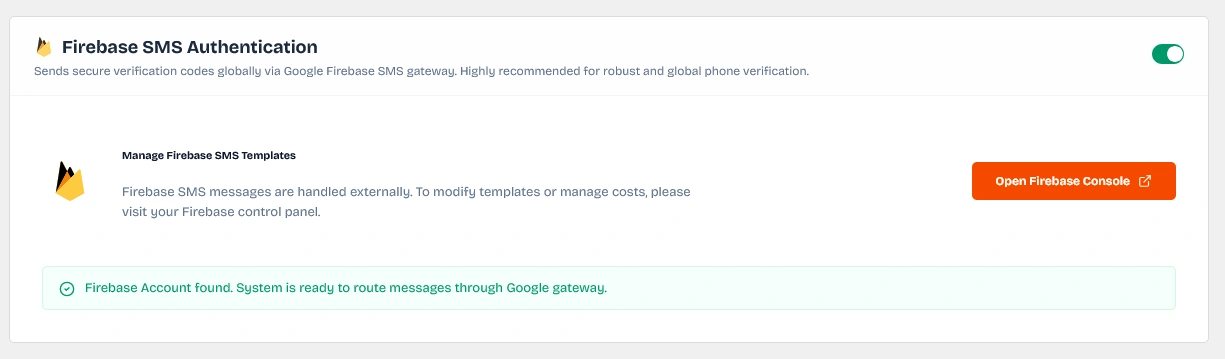
Manage Firebase SMS verification gateways, check credentials validity, and access the external Firebase Console.
Keywords: firebase sms authentication, api key config, google firebase sms4. Post-Login Redirection Rules
Control where users land after a successful authentication event depending on their account roles.
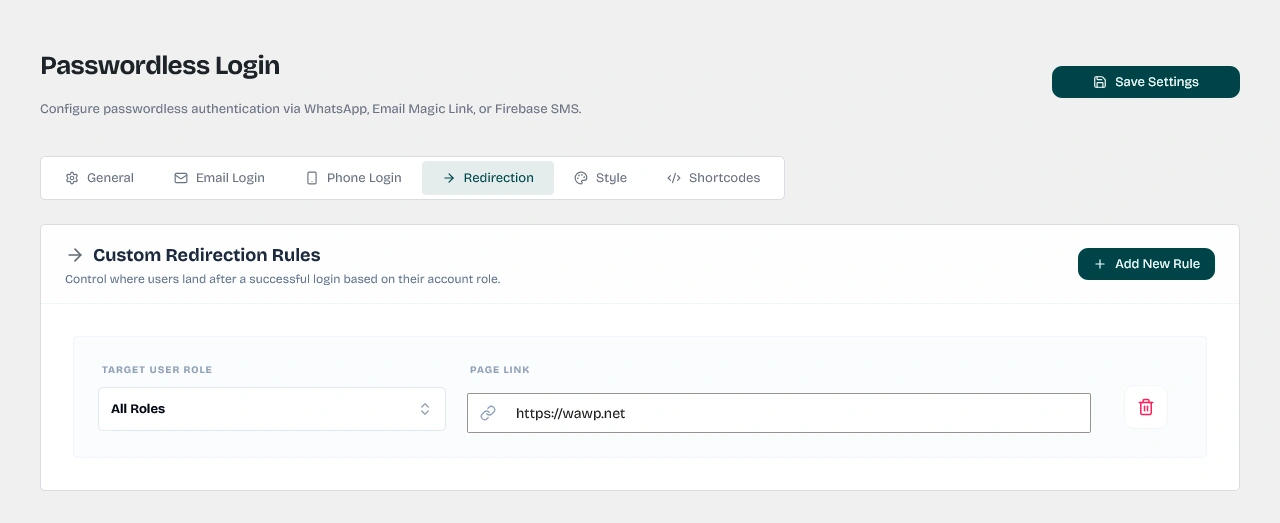
Define page routing links dynamically according to the user's role group.
Keywords: post login redirect, role redirection rules, administrator page redirectClick Add New Rule to create role-based routing:
- Target User Role (
role): Select All Roles (all) or choose a specific role (e.g., Administrator, WooCommerce Customer, Subscriber, Editor, Shop Manager). - Page Link (
redirect_url): Enter the destination URL or local path (e.g.,/wp-adminfor administrators, or/my-accountfor customers). - Empty State: If no redirect rules are defined, users will land on the default WordPress destination page.
5. Style Settings (Themes, Branding & Custom CSS)
Personalize the login form interface to match your website's exact design system.
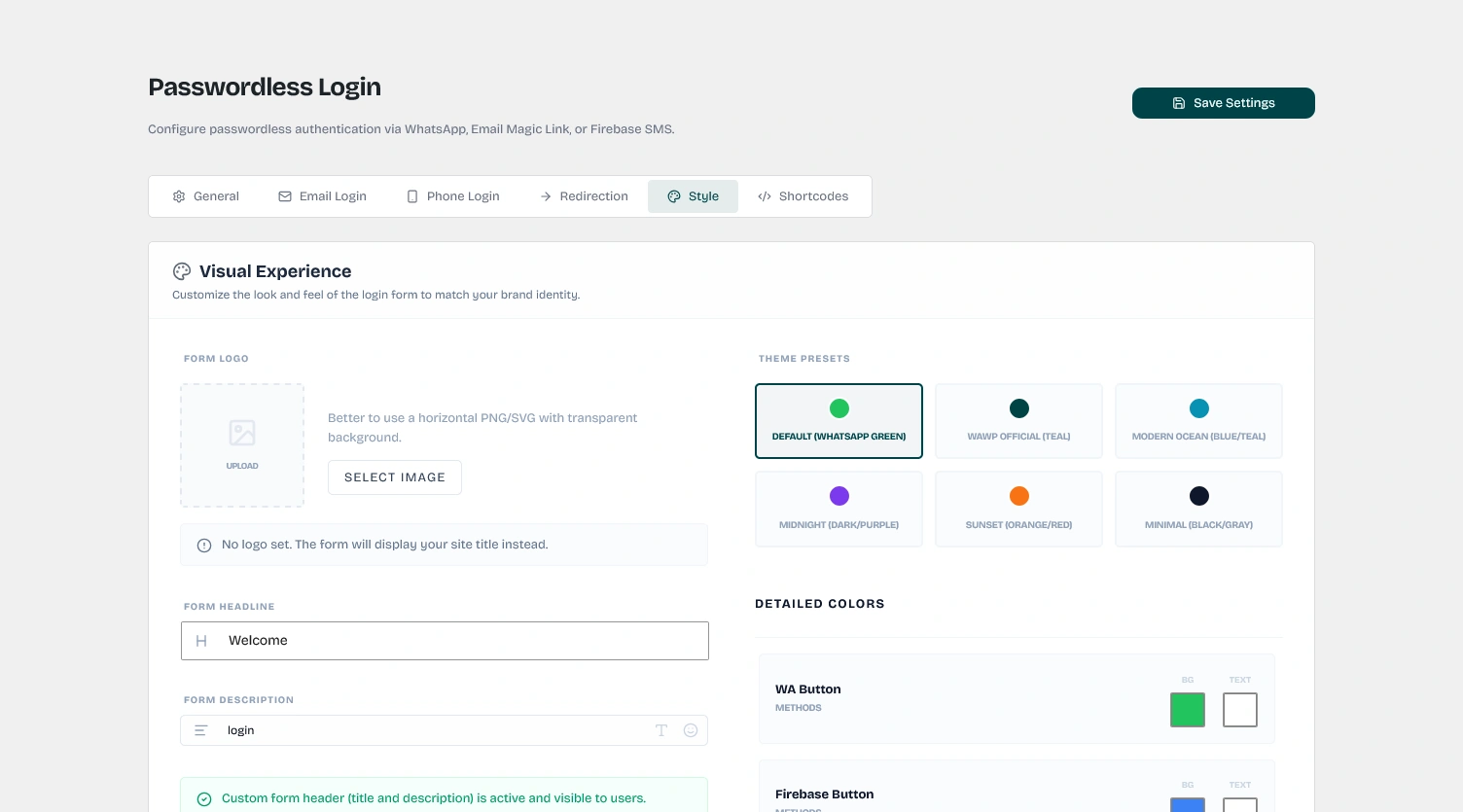
Override standard forms visual styles to apply custom branding logos, color presets, and styles.
Keywords: form style settings, premium login widget design, custom css brandingEnable Premium Design (enable_premium_design)
Switch this toggle on to override the default styles and apply custom branding.
Form Logo & Headers
- Form Logo (
logo): Upload a horizontal PNG/SVG with a transparent background to show at the top of the form instead of the site title. - Form Headline (
title): Add welcoming text (default: Welcome back). - Form Description (
description): Add description text with a rich text editor supporting WYSIWYG formatting, lists, and emojis (default: Choose a sign-in method to continue).
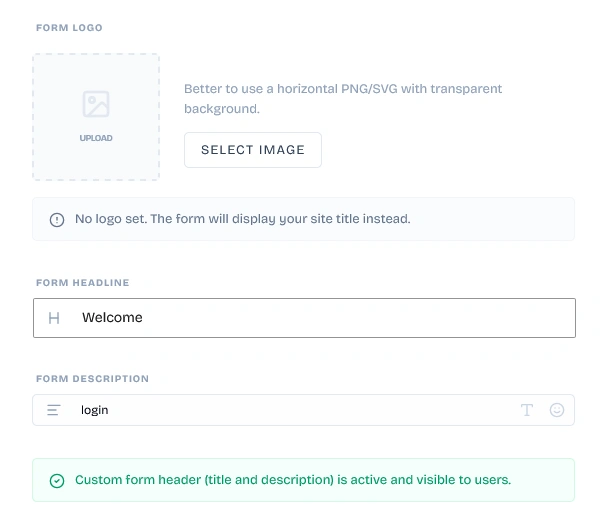
Upload custom horizontal logos, edit form welcoming titles, and customize descriptions.
Keywords: custom form logo upload, form headline title, rich description formattingTheme Presets (color_theme)
Select from six pre-designed color palettes:
- Default (WhatsApp Green): Classic WhatsApp style (#22c55e).
- Wawp Official (Teal): Clean brand teal (#004444) and navy (#141b38).
- Modern Ocean (Blue/Teal): High-contrast blue (#2563eb) and cyan (#0891b2).
- Midnight (Dark/Purple): Modern dark purple (#7c3aed) and indigo (#4f46e5).
- Sunset (Orange/Red): Vibrant orange (#ea580c) and red (#dc2626).
- Minimal (Black/Gray): Clean monochrome black (#171717) and gray (#d4d4d4).
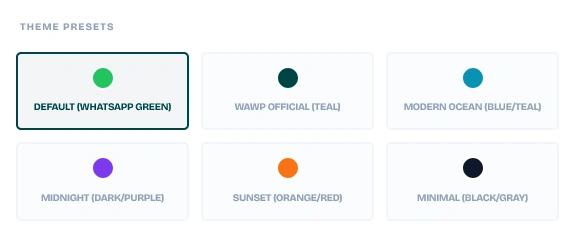
Quickly select one of the six premium color palettes to style all action elements and buttons automatically.
Keywords: theme presets, color theme selector, whatsapp green presetDetailed Color Customizer
Override background and text colors individually for:
- WA Button:
whatsapp_button_color/whatsapp_button_text_color - Firebase Button:
firebase_button_color/firebase_button_text_color - Email Button:
email_otp_button_color/email_otp_button_text_color - Password Login Button:
password_login_button_color/password_login_button_text_color - Verify Action Button:
verify_button_color/verify_button_text_color - Resend Button:
resend_button_color/resend_button_text_color - Show Password Button:
show_password_button_color/show_password_button_text_color - Back Link:
back_button_color/back_button_text_color
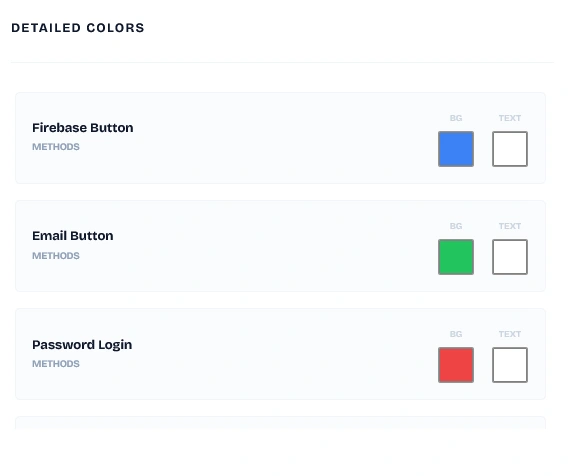
Fine-tune individual button colors, text colors, links, verification controls, and backgrounds.
Keywords: custom color picker buttons, whatsapp button text color, resend button background colorCustom Styling (CSS) (custom_css)
Write custom CSS rules to adjust any layout elements (e.g., custom margins, font scales, borders, or animations).
6. Shortcodes & Integrations
Deploy the passwordless login form on any page or integrate it directly into your theme templates.
- Appended Content (Shortcode Manager) (
custom_shortcode): Paste external shortcode elements (like Google reCAPTCHA or social login badges) in the settings list to display them directly below the login form.
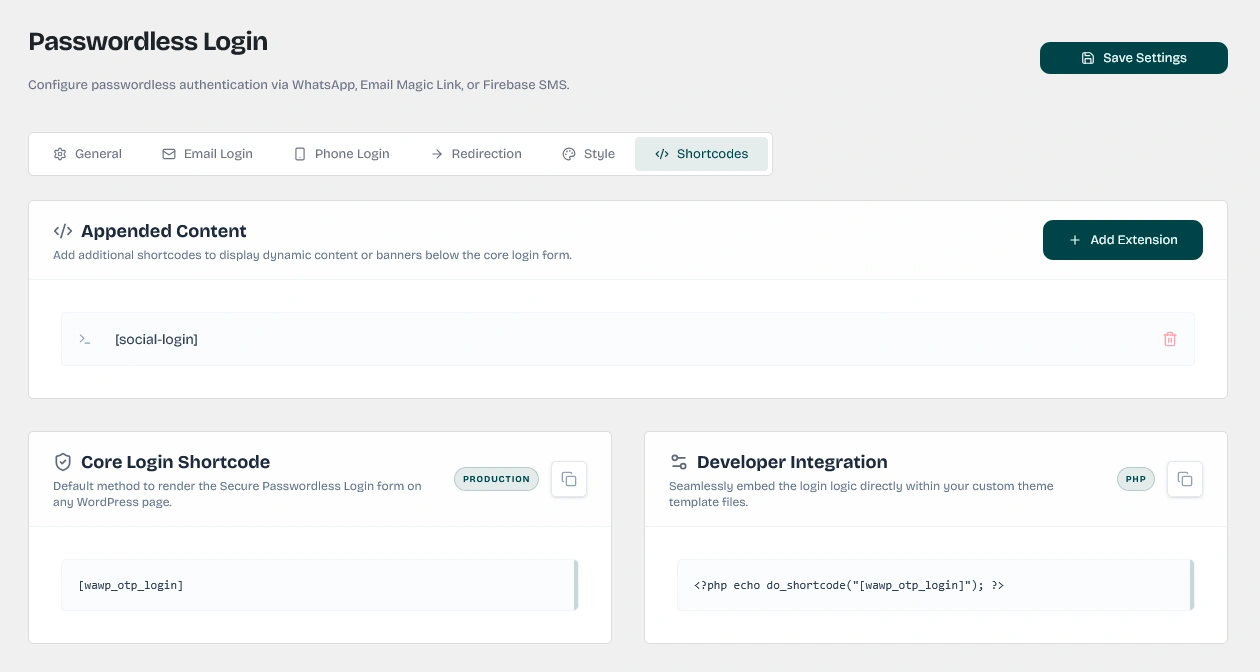
Append extra shortcodes directly below the passwordless login form wrapper (e.g. Google reCAPTCHA, social widgets).
Keywords: custom shortcode manager, appended content login form, social login integration- Core Login Shortcode: Copy and paste the standard shortcode on any post or page:
[wawp_otp_login] - Developer PHP Hook:
PHP Integration
Programmatically embed the login form into your theme template files:
<?php echo do_shortcode("[wawp_otp_login]"); ?>
Rate Limiting & Security (Backend Operations)
The Wawp plugin includes built-in backend protections to safeguard your login endpoints against spam and automated abuse:
- IP-Based Rate Limiting: The backend class-wawp-otp-login.php enforces a limit of 3 OTP requests per 60 seconds per individual IP address. Any requests exceeding this threshold will receive a
Too many requestserror. - Google reCAPTCHA: If Google reCAPTCHA protection is enabled globally, the frontend login form validates the user token through the Google reCAPTCHA API before authorizing the delivery of an OTP message.
- User Existence Check: If a user enters a phone number or WhatsApp account that does not match any registered WordPress user, the system blocks the OTP and redirects them to the Sign-up page (if configured) with their phone number prefilled in the query parameters (
?pre_phone=...).
Did this page help you?
99% found this article helpful (301 likes)
Related Articles
How to setup Advanced Country Code
The advanced country code feature allows you to automatically correct your customer numbers according to their country code so that your website can send messages correctly.
How to Setup Registration Form & Chat Verification
Learn how to setup chat verification and customize your signup form builder. Enforce mandatory user identity checks via WhatsApp OTP, Firebase SMS, or Email.
About Authentication Pages Settings
Configure secure WordPress WhatsApp authentication page settings. Learn to set up custom login redirection rules, replace default login pages, and automate signup routing via Wawp.
- Need help? Contact Support.
- Check out our Changelog.
- Join our Facebook Community.
- LLM? Read llms.txt.
OFFER ENDS SOON
Extra 30% OFF All Plans
Use this exclusive promo code at checkout to enjoy an extra 30% discount on top of current sales!
BOOST30