Are you tired of manually sending WhatsApp messages after every form submission? With the Wawp and Google Forms integration, you can automate this entire process. In just a few minutes, you can connect your Google Forms to Wawp and fire instant messages to users, admins, or both.
Wawp + Google Forms: No-Code/Low-Code WhatsApp Automation
Automate WhatsApp messages from Google Forms with Wawp. Our no-code/low-code guide helps you fire instant messages to users or admins on form submission.
3 min read·Updated May 12, 2026

This guide will walk you through setting up a powerful workflow with our unique script generator. For a deeper understanding of how these automations start, check out our Google Triggers Guide.
Introducing the Wawp – Google Runtime Script Generator
We built a special tool to make this automation seamless: the Wawp – Google Runtime Script Generator. This generator creates a ready-to-use Google Apps Script that you can simply copy and paste. For a detailed breakdown of all settings in the generator, see our Google Notifications Setup Guide.
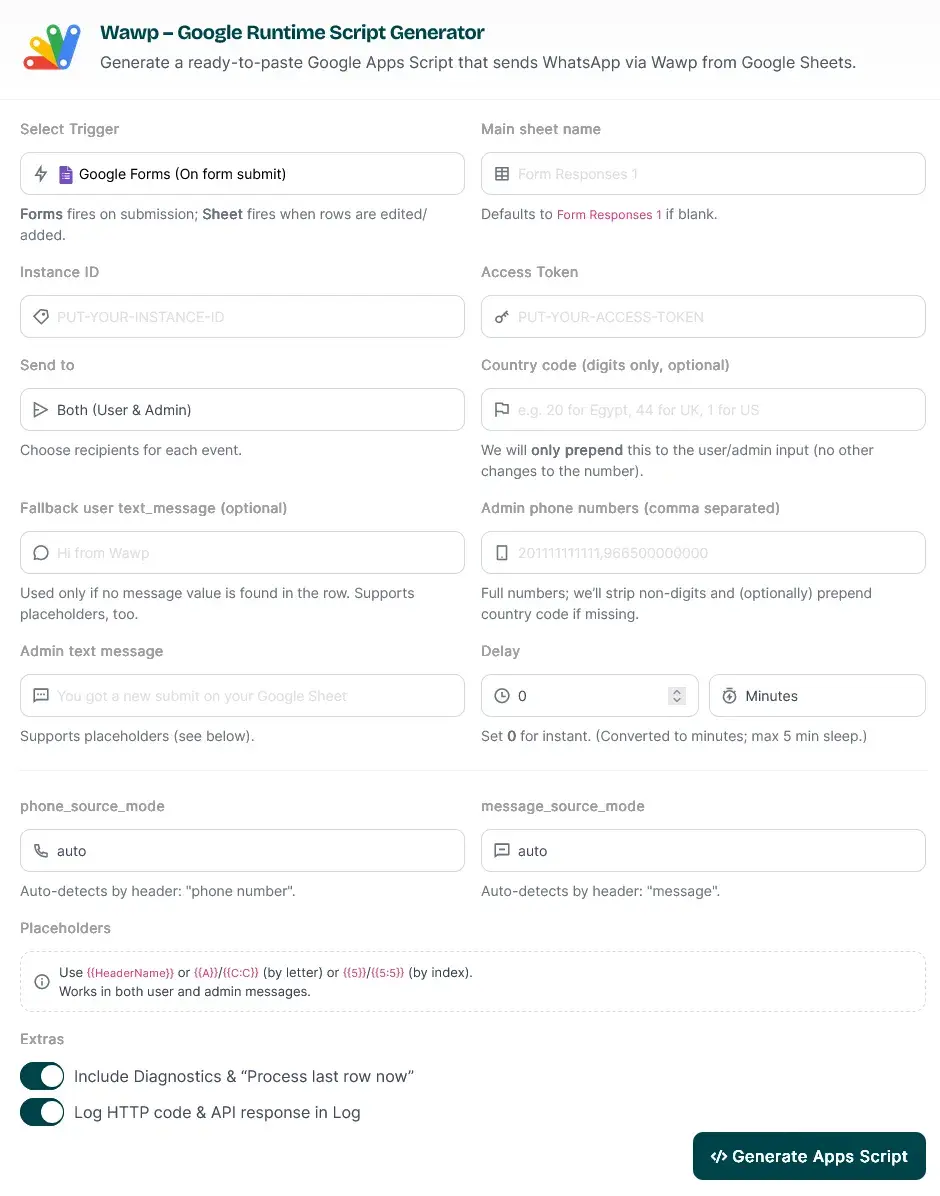
The Wawp tool for generating customized Google Apps Scripts to automate WhatsApp notifications from form submissions.
Keywords: google runtime generator, automation tool interface, script builderWho This Integration Is For
This no-code solution is perfect for a variety of use cases across different industries.
- University Students & Campus Teams: Send instant registration confirmations, exam reminders, or event updates.
- Local Services & Travel: Automatically send booking confirmations, directions, or appointment reminders to your clients.
- Educational Services & Courses: Notify students of enrollment, share class links, or send attendance follow-ups.
- E-commerce & Shipping: Automate order confirmations, send tracking numbers, and provide timely delivery updates.
Why the Wawp & Google Forms Integration Is Awesome
This automation tool is packed with powerful features designed to simplify your workflow.
- Instant Trigger: The script automatically runs the moment a new form is submitted.
- Flexible Recipients: Choose to send messages to the user who submitted the form, an admin, or both.
- Dynamic Placeholders: Use placeholders from your sheet columns (like
name,phone, ormessage) to personalize every message. - Robust Functionality: The script includes auto-detection for phone numbers and message columns, diagnostics, and a fallback message for missing fields.
- Quick Setup: You can get the entire workflow running in just a few minutes with our copy-and-paste script.
Get Started in Minutes: A Quick Guide
Follow these steps to connect Wawp to your Google Forms.
1
Access the Generator
Open the[Wawp – Google Runtime Script Generator](https://wawp.net/google-runtime-generator-tool/) and paste your Access Token.
2
Select Trigger Type
Select Google Forms (on form submit) as the trigger. Confirm the main sheet name (the default is
Form Responses 1).3
Define Recipients
Choose your recipients (User/Admin/Both) and set an optional delay if needed.
4
Write Message Payloads
Write your user and/or admin messages. Use placeholders from your sheet to personalize the text.
5
Enable Logging (Optional)
Enable diagnostics to get logs of your API responses and HTTP codes.
6
Generate and Deploy
Click Generate Apps Script. Copy the generated code, paste it into the Apps Script editor for your Google Sheet, save it, and deploy it.
7
Explore Advanced Configs
Read our detailed **[Google Notifications Setup](/en/articles/google-notifications-setup)** guide that breaks down every setting (placeholders, column mapping, examples) so you can tailor it to your use case with confidence.
8
Final Step: Execution
Once you have your code, follow our **[How to Execute the Wawp Google Script](/en/articles/execute-wawp-google-script)** tutorial to bring it to life.
Congratulations! Your automation is now live and will send a WhatsApp message every time a new form is submitted.
Did this page help you?
99% found this article helpful (297 likes)
Related Articles
Available Google Triggers: How to Automate Messaging
Learn about the Google triggers available for Wawp. Automate WhatsApp messages when a Google Form is submitted or a new row is added to a Google Sheet.
Set Up Google Forms & Sheets Notifications with Wawp
Master customizing your automated WhatsApp notifications from Google Sheets. This step-by-step guide explains every setting, from triggers to delivery.
Automate Your Sheet: How to Execute the Wawp Google Script
Step-by-step guide on running the Wawp Google script to set up automatic triggers and essential Settings/Log sheets.
- Need help? Contact Support.
- Check out our Changelog.
- Join our Facebook Community.
- LLM? Read llms.txt.