The Wawp System Status portal is a comprehensive diagnostic center designed to give you deep visibility into your platform’s underlying engine. It monitors real-time database integrity, server-side PHP allocations, background scheduler queues (WP-Cron), and third-party gateway connections, providing instant troubleshooting tools to keep your automated workflows running perfectly.
About Wawp System Status
This area helps you understand and troubleshoot execution statuses relating to critical system operations.
9 min read·Updated August 23, 2026

Central Diagnostics: The System Status board continuously aggregates reports from all connected services. If an automated notification fails to send or a verification OTP is delayed, this diagnostic center will pinpoint the exact bottleneck.
1. Top Utility Actions
At the top of the System Infrastructure page, four primary diagnostic actions provide instant, one-click administrative control over the entire system:
- Refresh Status: Instantly flushes all diagnostic transients and re-runs every environment check, database audit, and gateway connection loopback in real-time.
- Sync Users: Re-indexes all registered WordPress database users and synchronizes their active mobile verification logs to ensure dashboard user stats are 100% accurate.
- Copy for Support: Copies a clean, markdown-formatted technical printout of your entire environment (PHP specs, active plugins, theme version, and table structures) to your clipboard for easy sharing with Wawp support specialists.
- Repair All: The ultimate troubleshooting tool. Clicking this automatically repairs the database schema, creates missing custom tables, schedules missing cron jobs, and auto-assigns active WhatsApp senders to enabled features.

Four primary one-click diagnostic actions: Refresh Status, Sync Users, Copy for Support, and Repair All.
Keywords: refresh status, sync users, repair all, copy for support, system actions2. WordPress Environment
This panel checks the core WordPress configuration variables to ensure the local CMS stack is optimized for heavy messaging traffic:
- WordPress Version: Checks the installed core version and flags if it needs to be updated.
- Home & Site URLs: Confirms the primary URL definitions registered in your WordPress settings.
- Multisite Status: Identifies if the plugin is running in a single-site or network multisite environment.
- WP Memory Limit: Displays the memory allocated to WordPress, ensuring it is healthy.
- System Language: Displays the active locale (e.g.
en_US (LTR)orar (RTL)) to verify proper layout orientation. - Uploads & Plugins Directory Writable: Audits files permissions to ensure Wawp can safely write media attachments and process automated software updates.
- REST API Accessibility: Tests loopback requests to
/wp-json/wp/v2/types/postto ensure the WordPress REST API is fully functional. - Loopback Check: Validates whether loopback requests are active, which is critical for background queues and async event handling.
- SSL Status: Verifies that your site is loading securely over HTTPS, keeping authentication traffic safe.
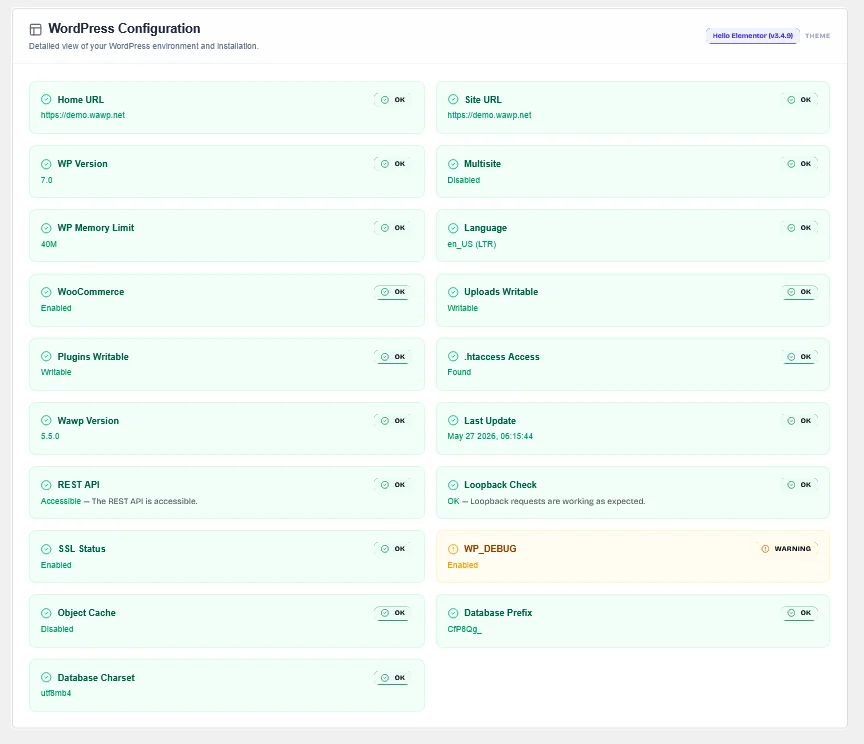
Technical breakdown of WordPress version, database schema, directory permissions, and REST API accessibility.
Keywords: wordpress status, system environment, wawp compatibility, directory permissionsWooCommerce HPOS Verification
When auditing the e-commerce environment, the diagnostic engine checks whether WooCommerce High-Performance Order Storage (HPOS) is enabled. HPOS utilizes custom database tables rather than standard WordPress postmeta, accelerating order processing speeds for large transactional sites.
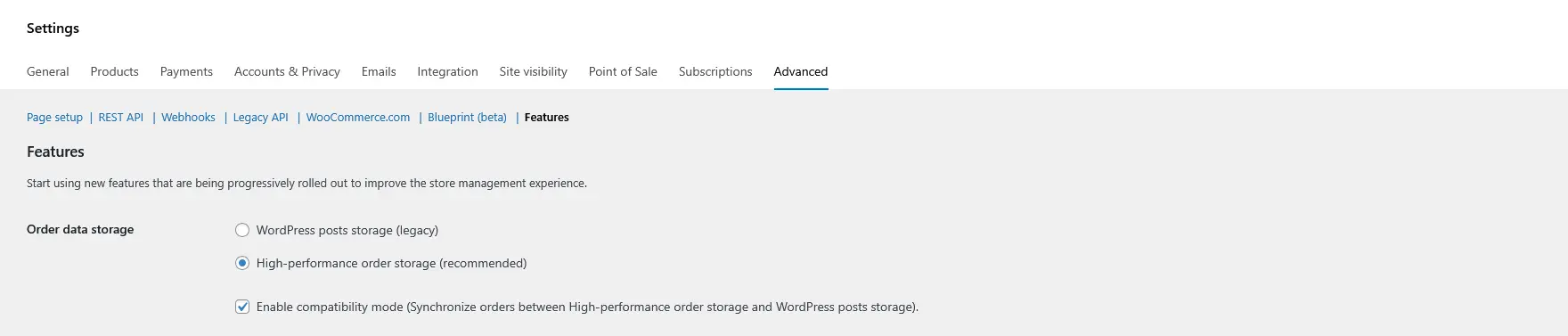
Verifying WooCommerce High-Performance Order Storage (HPOS) compatibility and custom database settings.
Keywords: woocommerce hpos, high performance order storage, custom order tables3. Server Environment
This section audits your backend server allocations to ensure the web server has enough power to support asynchronous messaging and bulk marketing broadcast campaigns:
- Server Software: Identifies the running web server (e.g. Apache, Nginx, or LiteSpeed).
- PHP Version: Confirms that your PHP interpreter is modern and secure (requires >= 7.4).
- PHP Memory Limit: Displays the memory limit allocated to PHP (recommends at least
1024Mfor massive bulk campaigns). - PHP Post Max Size: Displays the maximum size of data that can be submitted in a single request.
- PHP Time Limit: Displays the maximum script execution timeout (recommends at least
300 secondsto prevent timeout termination during bulk blasts). - Max Input Time & Max Input Vars: Displays input processing thresholds.
- cURL Version: Confirms the presence of cURL, which is required for secure remote API connections.
- ZipArchive: Confirms that the Zip module is active on the server, which is required for import/export tools.
- Server IP: Displays the public IP of your web server (useful when whitelist-authorizing connections).
- Proxy & CDN Detection: Automatically identifies if the website is routed behind a proxy or Content Delivery Network (CDN) like Cloudflare, Sucuri, CloudFront, or Fastly.
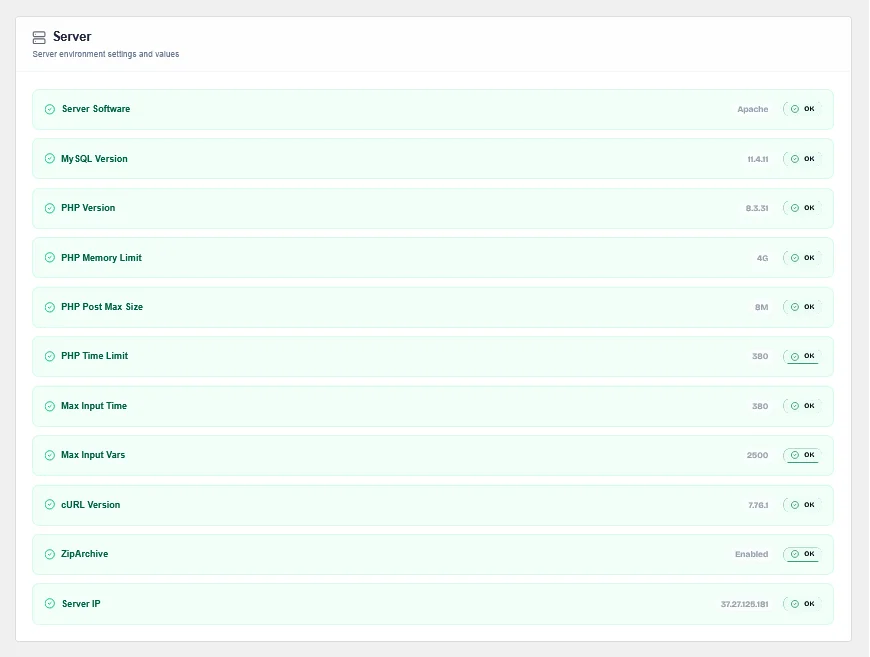
Monitoring PHP memory limits, execution times, cURL capabilities, and CDN proxy status.
Keywords: server health, php configuration, hosting resources, cdn proxy, memory limit4. Database Health
Displays a real-time health checklist of all custom SQL tables required by the Wawp framework. It flags whether tables are Optimized, Missing, or Incomplete (outdated structure/missing columns):
- wawp_flows & wawp_flow_steps: Handles the logic, stages, and metadata of your Flow Builder automated notifications.
- wawp_abandoned_carts & wawp_abandoned_cart_notifications_log: Tracks incomplete shopping carts and schedules timely recoveries.
- wawp_instance_data: Manages local sessions for connected WhatsApp gateway devices.
- wawp_blocked_numbers: Stores blocked contacts to prevent unwanted automated messages.
- wawp_notifications_log: Keeps detailed historical records of all dispatched notifications.
- wawp_signup_settings: Manages custom registration field configurations.
Granular Database Table Controls
For precise debugging, the dashboard provides specific, one-click controls for each table:
- Create: Generates a missing database table from scratch in one click.
- Repair: Fixes existing tables by injecting missing columns or fixing mismatched schemas.
- Empty: Wipes out all table rows (truncates data) with a double-confirmation safety pop-up.
- Drop: Completely deletes the database table for fresh reinstalls.
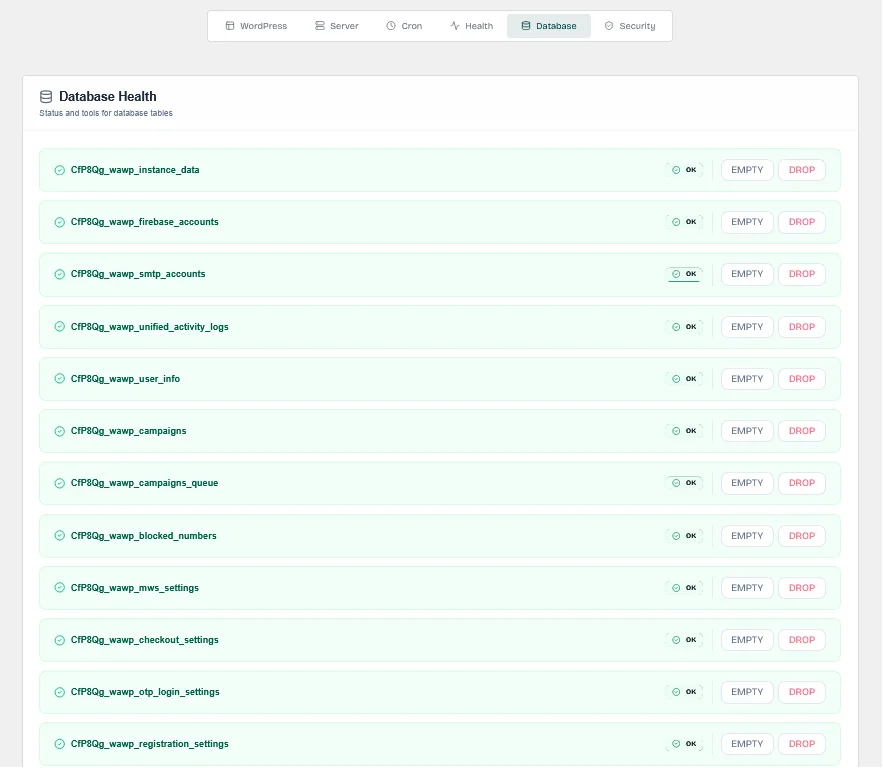
Monitor custom database tables status and utilize granular Create, Repair, Empty, and Drop controls.
Keywords: database schema, sql tables, repair database, create database tables5. Wawp System Health
This tab checks your active WhatsApp senders, third-party SMS providers, and custom email integrations to ensure all message dispatch channels are configured properly:
- WhatsApp Multi-Device Senders: Confirms if you have connected, active, online WhatsApp channels.
- Sender Config Statuses: Verifies that your active automation features have been successfully assigned an online sender:
- OTP Login Sender: Handles passwordless authentication and user login codes.
- WhatsApp OTP Signup Sender: Manages verification codes for new account signups.
- Checkout OTP Verification Sender: Protects WooCommerce from checkout fraud.
- General System Sender: Sends general administrative alerts.
- Abandoned Cart Sender: Handles WooCommerce cart recovery reminders.
- User & Admin Notifications Senders: Dispatches WooCommerce customer alerts and administrative summaries.
- Meta WhatsApp Cloud API: Validates the official Meta Cloud API parameters (API Token, WABA ID, Phone ID).
- SMS / Firebase Configuration: Audits Firebase credentials (apiKey, authDomain, projectId) used for identity verification.
- SMTP Configuration: Displays custom SMTP parameters (host, user, auth status) or fallback to default WordPress mailers.
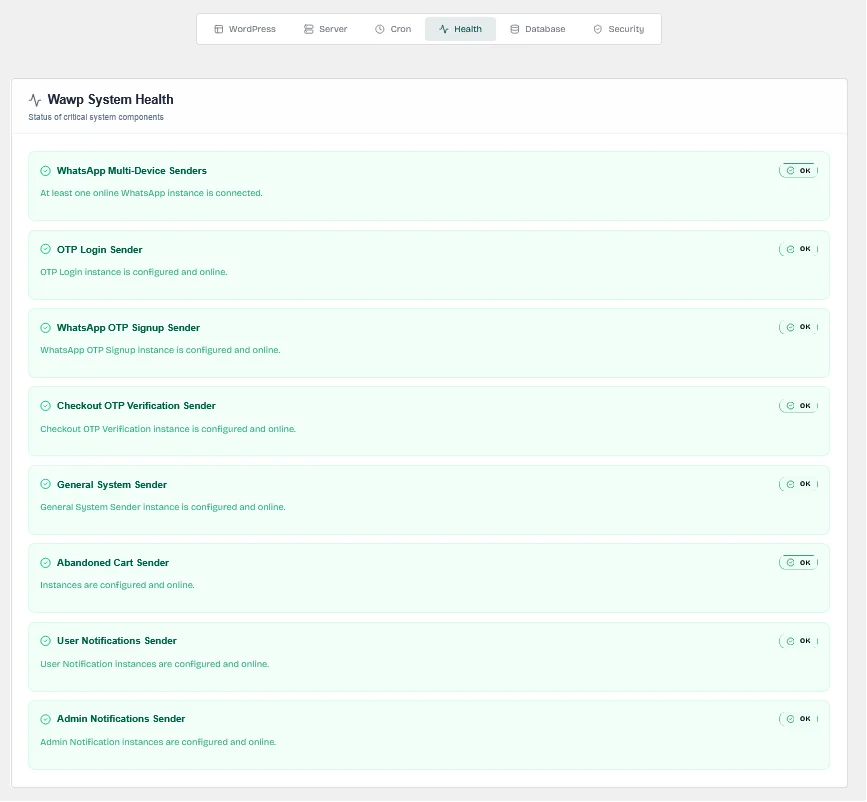
Verifying the connection status of WhatsApp Senders, Meta API credentials, Firebase, and SMTP.
Keywords: wawp connection check, whatsapp gateway health, instance status, smtp mailer, meta api6. Security
The Security tab runs a dedicated audit of your core WordPress security and performance configuration. Each item is flagged with a color-coded status — green OK for passing checks and orange WARNING for items that need attention:
- SSL Status: Confirms that your site is loading over a secure HTTPS connection, protecting all authentication and OTP traffic from interception.
- PHP Memory Limit: Verifies that the PHP memory allocation is sufficient (your site is currently running at 4G, which is well above the recommended minimum).
- PHP Max Execution Time: Ensures the server script timeout is long enough to complete bulk notification campaigns without being killed mid-execution.
- WordPress Debug Mode: Checks whether
WP_DEBUGis enabled. This should always be disabled on live production sites to avoid exposing sensitive system internals to visitors. - Debug Log: Checks whether
WP_DEBUG_LOGis active. If error logging to a file is enabled on production, it may expose sensitive stack traces — it should be turned off. - WP-Cron Constant: Verifies whether the
DISABLE_WP_CRONconstant is defined inwp-config.php. This is shown for reference and is linked to your cron configuration settings.
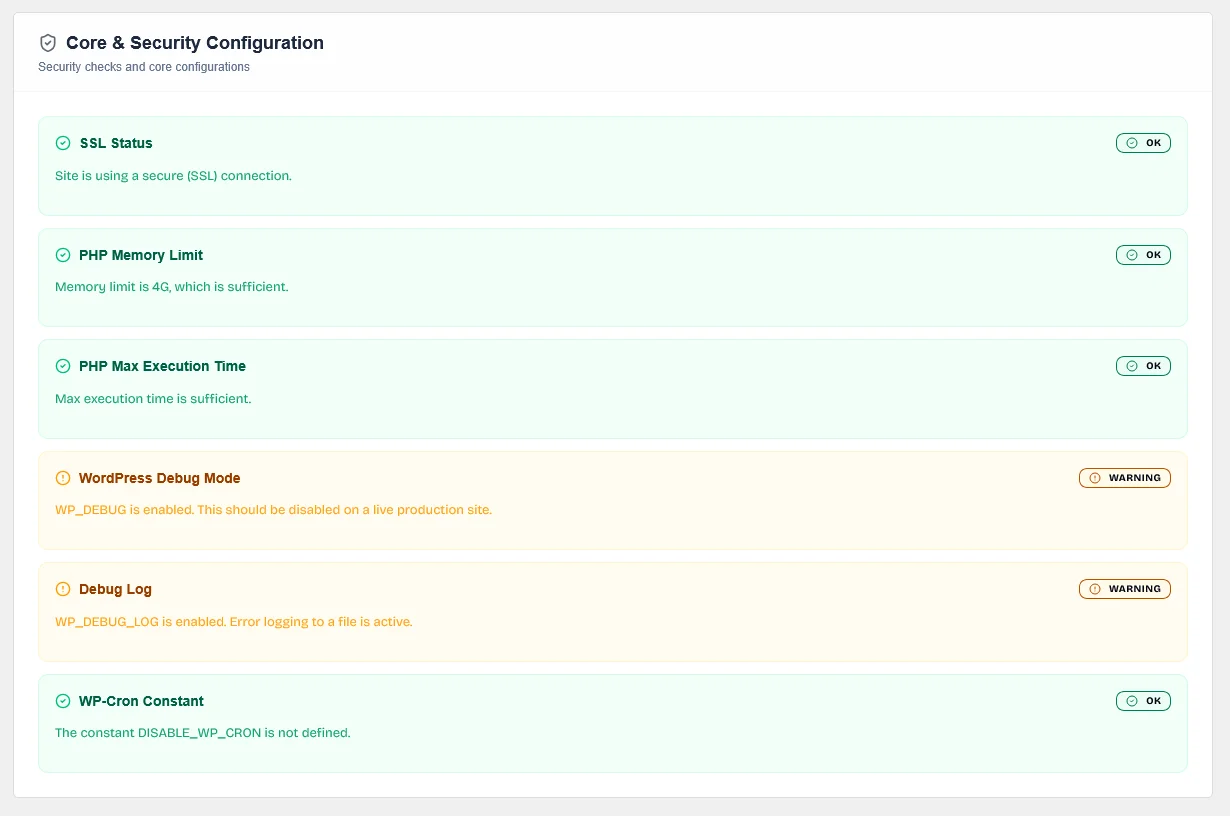
Color-coded security and performance audit covering SSL, PHP limits, debug mode, debug logs, and WP-Cron constant status.
Keywords: security tab, ssl status, wp_debug, debug log, php memory, wp-cron constant, wordpress security7. WP-Cron Engine
This section manages the background queue engine responsible for triggering automated actions, processing campaigns, and executing cart reminders:
- WP-Cron Status: Indicates if the background scheduler queue is currently active and healthy.
- Last Fired Timestamp: Displays exactly when the scheduler last executed a background cycle.
- System Cron URL: Provides a dedicated external execution link. We highly recommend copying this URL and adding it as a real server-side Linux Cron Job in your hosting panel (e.g. cPanel or Plesk) to trigger every minute. This guarantees absolute reliability, ensuring backgrounds tasks run even if your site has no visitors.
Scheduled Tasks Monitor
Displays a list of all scheduled automation events in your system:
- wawp_cron_refresh_system_info: Periodically updates the diagnostic report cache.
- wawp_cron_hourly_self_repair: Automatically audits and repairs settings and databases every hour.
- wp_campaigns_cron_send_advanced: Automatically processes and broadcasts outgoing bulk campaign queues.
- wawp_cron_process_abandoned_cart_notifications: Processes scheduled cart recovery notifications.
- wawp_cron_clear_expired_otps: Wipes out old OTP codes to keep databases lean.
Each event includes interactive controls:
- Run: Instantly triggers the background execution of the specific task queue.
- Fix: Re-schedules the task if it was dropped or disabled.
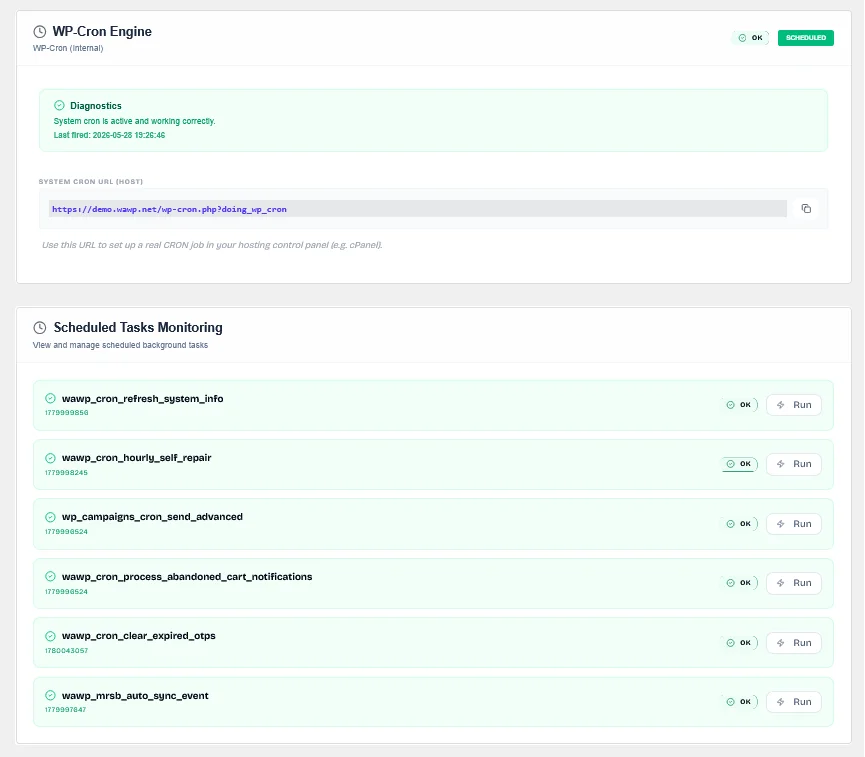
Monitoring background cron processes, scheduling Linux server cron jobs, and manually triggering task queues.
Keywords: wp-cron status, scheduled tasks, background events, cpanel cron, queue management8. Legacy Data Migration
Upgrading from older plugin versions is fully supported with these automated migration utilities located at the bottom of the System Status page:
- Legacy Registration Migration: Transfers registration layouts, custom fields, and configurations from old structures to the upgraded registration system.
- Notifications Flow Builder Migration: Automatically migrates old notification rules into the visual, highly scalable React Flow Builder structure.
- Import Default Email Templates: Imports high-converting pre-designed email templates (such as the default "Login Link" OTP templates) into your custom database tables.
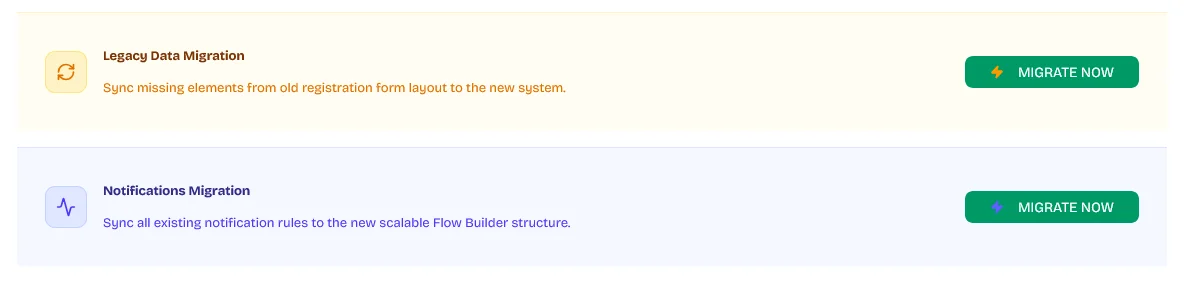
Automated migration tools for old registration forms, legacy notification flows, and custom template imports.
Keywords: legacy migration, data import, flow builder migration, email templates importDid this page help you?
99% found this article helpful (198 likes)
Related Articles
Remote Support & Troubleshooting
Enable secure, one-time dashboard access for Wawp support administrators to help you troubleshoot issues.
Wawp Shortcodes
Add advanced Wawp forms seamlessly to any layout template page using native WordPress Shortcodes.
Fix sending issues in Wawp plugin
Step-by-step expert diagnostic procedures the support team executes to actively resolve persistent outbound messaging bottlenecks.
- Need help? Contact Support.
- Check out our Changelog.
- Join our Facebook Community.
- LLM? Read llms.txt.
OFFER ENDS SOON
Extra 30% OFF All Plans
Use this exclusive promo code at checkout to enjoy an extra 30% discount on top of current sales!
BOOST30