Master WhatsApp delivery compliance. Configure global suppression lists, automated keyword opt-outs, manual blocklists, and automated user re-subscription pathways to maintain maximum sender reputation.
4 min read·Updated August 23, 2026
To achieve sustainable, highly scalable WhatsApp automation, preserving your sending reputation is absolutely critical. Sending messages to contacts who no longer wish to receive communications significantly increases user reports, inevitably leading to automated heuristics flagging your linked instances as spam.
Wawp resolves this challenge through an advanced, highly granular Suppression & Opt-out Engine. This specialized management layer intercepts outgoing message queues in real time, guaranteeing that blacklisted or unsubscribed destinations are automatically dropped before raw payload transmission occurs.
Accessing the Suppression Control Center
You can govern your target audience lists directly from your core navigation structure.
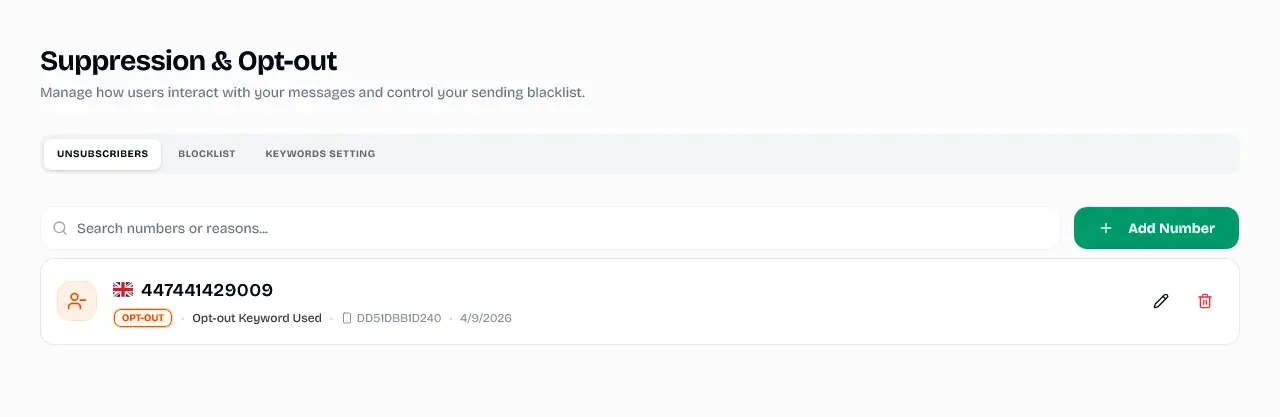
Search Box Utility: A highly responsive dynamic filter bar (Search numbers or reasons...) allows you to query records instantly using specific numeric strings or automated tracking logic descriptions.
Manual Injection Button (+ Add Number): Allows administrative operators to pre-emptively input user phone numbers into the suppression matrix, bypassing automated keyword workflows to accommodate telephone or email opt-out requests.
Status Indicators: Every row encapsulates vivid tracing states:
Status Badge: Highlights a highly visible OPT-OUT status capsule.
Instance Traversal Metadata: Encodes the processing origin footprint (DD51DBB1D240) alongside the exact initialization timestamp (4/9/2026).
Row Governance Actions: Hovering over a row exposes dedicated quick utilities:
Edit Utility (✏️): Allows you to attach or amend localized administrative rationale notes directly onto the suppressed profile.
Delete Utility (🗑️): Instantly purges the target contact from the suppression list, fully reinstating automated dispatch capabilities for future message iterations.
2. Blocklist Tab (Explicit Manual Blacklist)
The Blocklist layout operates with similar UI symmetry but enforces an explicit, permanent administrative block intended for malicious contacts, automated spam traps, or severely unresponsive destinations.
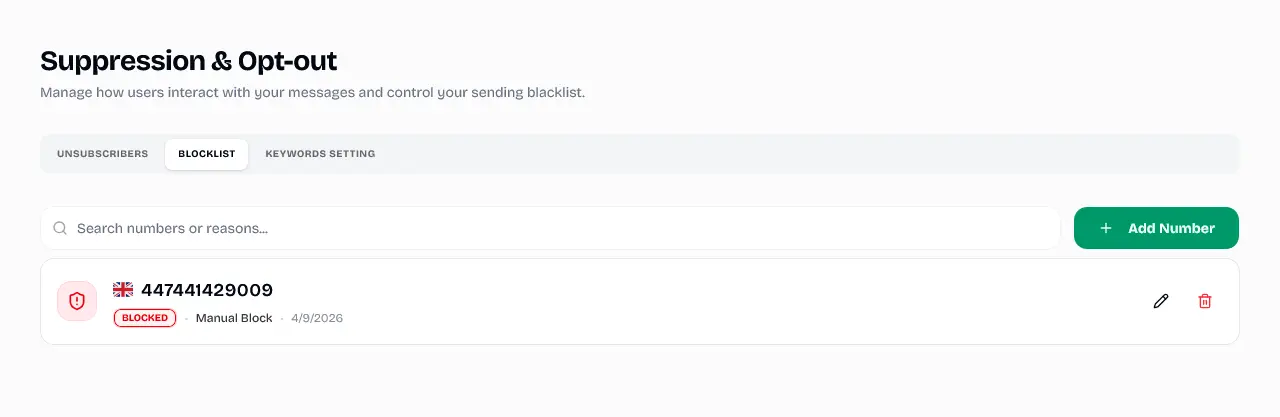
Manual Blocklist Management
The administrative interface for manually blacklisting specific contacts from all future communications.
Explicit Action State: Displays a distinct BLOCKED status badge to clearly separate manually restricted users from automated keyword unsubscribers.
Origin Notation: Clearly details the restricting mechanism as a Manual Block.
Symmetrical Control: Maintains full operational parity with inline search tools, dedicated numeric entry additions, custom descriptor editing, and record purges.
3. Keywords Setting (Real-Time Heuristic Engine)
The true core of Wawp’s automated compliance framework resides within the Keywords Setting dashboard tab. Here, you define the absolute literal text strings that govern automatic contact lifecycle transitions.
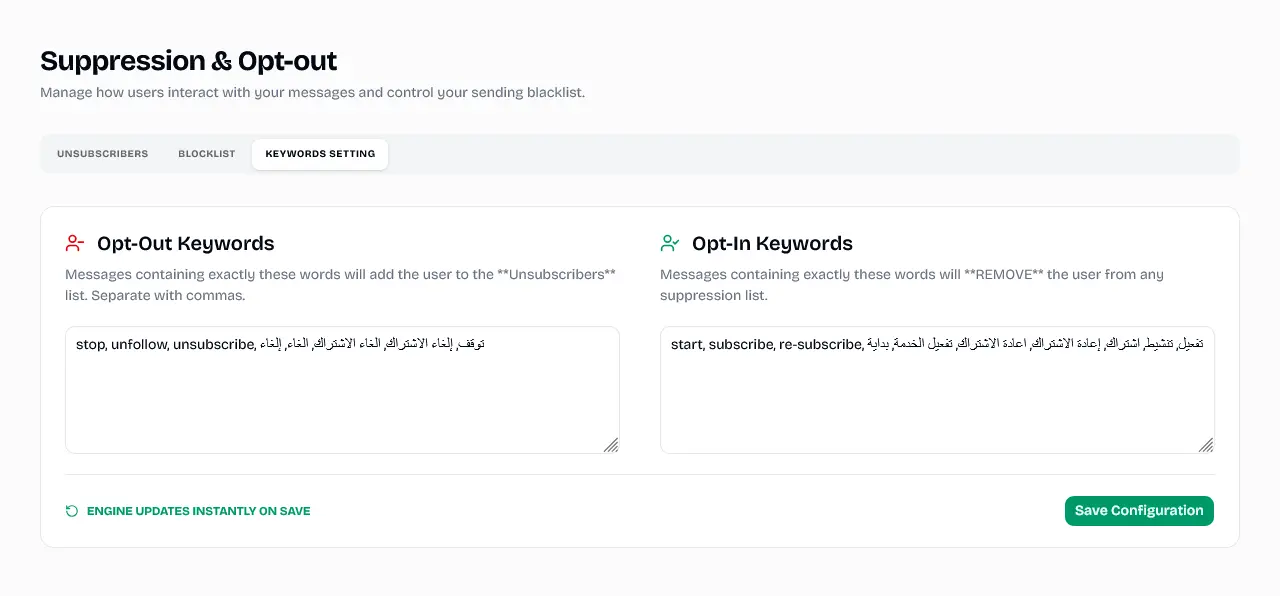
Suppression Keywords Engine
Configuration dashboard for defining literal text strings that trigger automatic opt-out and opt-in transitions.
Messages received by your linked instance containing exactly these literal comma-separated strings will instruct background daemons to instantly append the target sender to the Unsubscribers suppression list.
To ensure maximum internationalized coverage, Wawp ships with multi-lingual industry-standard compliance defaults pre-populated:
Conversely, if an unlinked or previously suppressed contact sends a message string containing any designated Opt-In keyword, the engine intercepts the incoming packet and immediately REMOVES the user from all underlying suppression or blocklists, instantly re-establishing authorized bidirectional communication.
Default inclusion terms encompass:
English Formats:start, subscribe, re-subscribe
Arabic Formats:تفعيل, تنشيط, اشتراك, إعادة الاشتراك, اعادة الاشتراك, تفعيل الخدمة, بداية
Real-Time Cluster Commits
A dedicated persistent feedback status (ENGINE UPDATES INSTANTLY ON SAVE) guarantees that clicking the Save Configuration button commits keyword matrix rules directly into master high-speed cache tiers, activating immediate compliance enforcement globally.