Sending duplicate or identical messages in bulk or rapid succession is a primary trigger for WhatsApp automated spam filters. The Unique Message IDs tool is a critical anti-ban feature that introduces dynamic randomness into your outbound messages, protecting your WhatsApp sender numbers from being flagged or banned.
How to Configure Unique Message IDs
Prevent WhatsApp bans by appending randomized, unique message identifiers to bypass automated spam filter checks.
2 min read·Updated August 23, 2026

1. Anti-Ban Mechanics: Why Randomization is Vital
WhatsApp's security algorithms scan the exact text structure of messages dispatched from third-party systems.
- Duplicate Templates Flagging: If the system detects the exact same notification template (e.g. standard payment reminders or signup welcomes) sent repeatedly to many contacts without variation, the account is flagged as an automated spam bot.
- Dynamic Tokens Insertion: Toggling the Unique Message IDs switch automatically appends a unique, randomized alphanumeric tracking token to the footer of every outbound message block.
- Bypassing Filters: This ensure that even if you send identical text notifications to 10,000 customers simultaneously, every single message contains unique trailing character sets. This breaks duplicate detection and helps prevent sudden account bans.
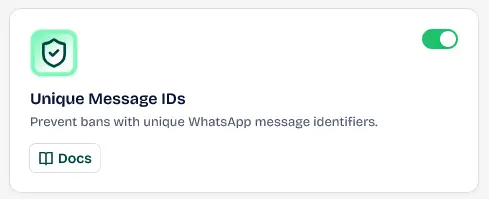
Preventing WhatsApp bans by appending unique identifiers to each outbound message for variety.
Keywords: prevent whatsapp bans, unique message content, delivery security2. Setting Up Unique Message IDs
To activate and configure unique trailing codes:
- Navigate to your Wawp dashboard: Wawp > Senders > Messaging Tools.
- Locate the Unique Message IDs card.
- Toggle the switch status to ACTIVE.
- Once activated, the system automatically appends unique tokens to your outbound transactional notifications (WooCommerce checkout confirmations, OTP login codes, etc.) and bulk campaigns.
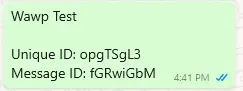
Setting up the length and type of unique identifiers for automated and bulk messaging.
Keywords: randomized text, message customization, improve deliveryPlaceholder Optimization
If you are already utilizing custom placeholders (e.g. {customer_name}, {order_number}) in your message body copy, your templates already contain some local variety. However, we highly recommend enabling Unique Message IDs alongside placeholders to ensure absolute randomness across all automated dispatches.
Make sure to monitor your sender delivery statistics in the Activity Hub to verify successful delivery and check read receipt metrics in real-time.
Did this page help you?
100% found this article helpful (0 likes)
Related Articles
About Messaging Tools
Get an overview of Wawp's advanced Messaging Tools designed to optimize delivery rates, blacklist contacts, and log transactional events.
How to Block WhatsApp Numbers and Emails
Manage blocked users and blacklist specific phone numbers or email addresses globally from receiving automated WhatsApp alerts, emails, or OTP pings.
About Wawp Activity Hub
Monitor user-centric actions, login sessions, site movements, and unified communication delivery metrics in real-time.
- Need help? Contact Support.
- Check out our Changelog.
- Join our Facebook Community.
- LLM? Read llms.txt.
OFFER ENDS SOON
Extra 30% OFF All Plans
Use this exclusive promo code at checkout to enjoy an extra 30% discount on top of current sales!
BOOST30