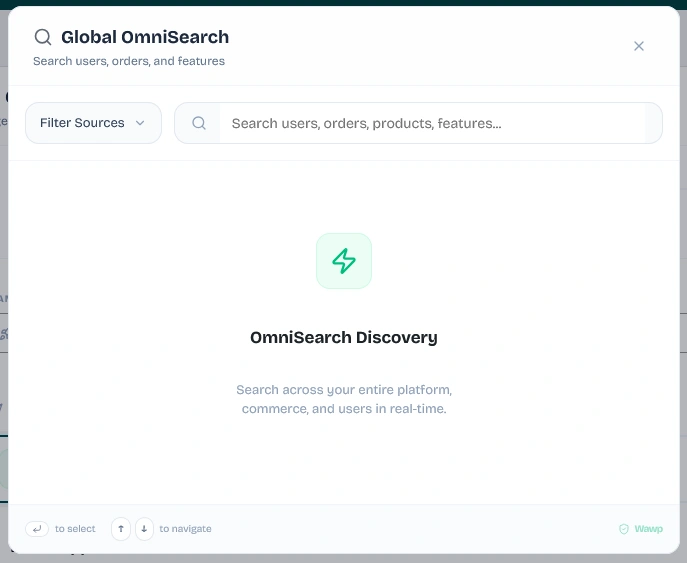
Learn how to use Wawp's comprehensive, unified command center to search settings, WooCommerce orders, WordPress users, active campaigns, and messaging logs.
Managing an automated messaging infrastructure alongside an active e-commerce storefront can make finding specific records a challenge. Wawp introduces Global OmniSearch—a lightning-fast, unified command center built directly into your WordPress plugin.
Using Global OmniSearch, you can instantly search, locate, and navigate to any plugin tab, specific settings parameters, WordPress users, WooCommerce orders, active campaigns, and messaging logs in real time.
1. Quick Access Keyboard Shortcut
Designed for a mouse-less, highly productive developer workflow, the search modal can be triggered instantly from anywhere inside the Wawp dashboard using a global keyboard shortcut:
Windows & Linux: Press Ctrl + K
Mac OS: Press ⌘ + K
You can also trigger it manually by clicking the magnifying glass icon (Search) located in Wawp's main header bar. The modal overlays in 0ms and automatically autofocuses the search input, allowing you to begin typing immediately.
2. Dual-Engine Architecture
Global OmniSearch is powered by a high-performance dual-engine architecture that balances client-side speed with deep database index matching:
A. Instant Client-Side Engine (0ms Plugin Indexing)
When you begin typing, Wawp's React-based front end immediately queries a pre-loaded local index mapping (searchIndex.ts). This indexes all plugin menus, sub-sections, tabs, and individual settings fields:
Zero Latency: Results render instantly as you type without waiting for server responses.
Fuzzy Search: Typo-tolerant keyword mapping matching sections like "Activity Hub", "Meta API Sender", "reCAPTCHA", "Block Manager", etc.
Deep Linking: Selecting a settings result navigates you straight to the corresponding tab, scrolls to the option, and applies a brief flashing highlight focus (highlight_setting) to guide your eyes.
B. Deep Server-Side Engine (Real-Time Database Queries)
When your search query is 2 characters or longer, the background engine securely proxies a request to Wawp's WordPress REST API endpoint (/wp-json/wawp/v1/global-search). This performs highly optimized, indexed queries across your entire database:
WordPress Users: Searches username logins, display names, nicenames, emails, and meta phone fields (such as billing_phone and _wawp_phone).
WooCommerce Orders: Searches orders by ID number, customer billing first/last name, and email. The system fully supports standard custom post types as well as HPOS (High-Performance Order Storage).
WooCommerce Subscriptions: Searches subscriptions by ID, billing email, and active statuses.
WooCommerce Products: Queries catalog items by name, SKU, or price.
WooCommerce Coupons: Locates active discounts, coupon codes, and amount configurations.
Wawp Campaigns: Finds bulk broadcast campaigns by name, displaying processed ratios and delivery status.
Core WordPress Content: Locates active Posts, Pages, and Media attachments with image thumbnail previews.
3. Advanced Search Features & Filters
Global OmniSearch includes productivity features designed to refine results and save time:
Source Filtering Dropdown
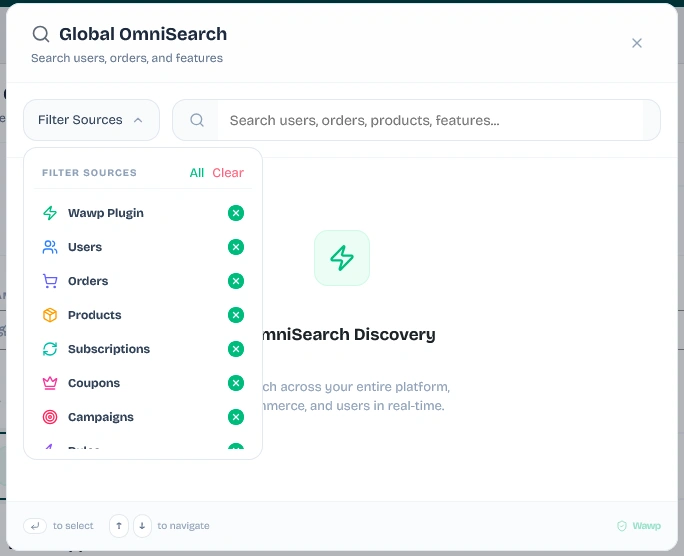
Tapping the Filter Sources button displays a checkbox grid allowing you to restrict queries to specific data pools. This reduces server strain and visual noise. Sources include:
Wawp Plugin (menus and tabs)
Users (user directory profiles)
Orders (WooCommerce sales)
Products (catalog items)
Subscriptions (recurring plans)
Coupons (discount codes)
Campaigns (marketing broadcasts)
Rules (automated notifications)
Posts, Pages, Media, and Categories (WordPress core)
Pro-Tip: You can quickly enable all filters by clicking All, or clean the selection to focus exclusively on plugin menus by clicking Clear.
Persistent Search History
The modal stores your last 5 successfully clicked results inside local browser memory (wawp_search_history). When you first open the search modal with an empty input, these recents display immediately, allowing you to jump back into active tasks without re-typing. You can clear this history anytime by clicking the red Clear button.
Deep Log Search Redirection
If you are searching for diagnostic data, the system automatically appends a special shortcut item at the bottom of the list:
Search Activity Hub: "your query"
Selecting this instantly redirects you to Wawp's Activity Hub, pre-populating the logs drawer with your query parameters to search raw cURL logs, recipient histories, and error traces.
Keyboard Navigation Support
ArrowDown / ArrowUp: Move focus between results smoothly.
Enter: Launch the currently selected search destination.
Escape: Instantly dismiss and close the search modal overlay.