Optimizing the content of automated notifications and bulk campaigns is essential for successful e-commerce marketing. Wawp introduces a state-of-the-art, React-based Smart WhatsApp Message Editor across your WordPress dashboard.
The editor is designed to protect your sender numbers from carrier bans, verify copy compliance, inject dynamic customer personalization tags, and simulate realistic high-fidelity message previews in real time.
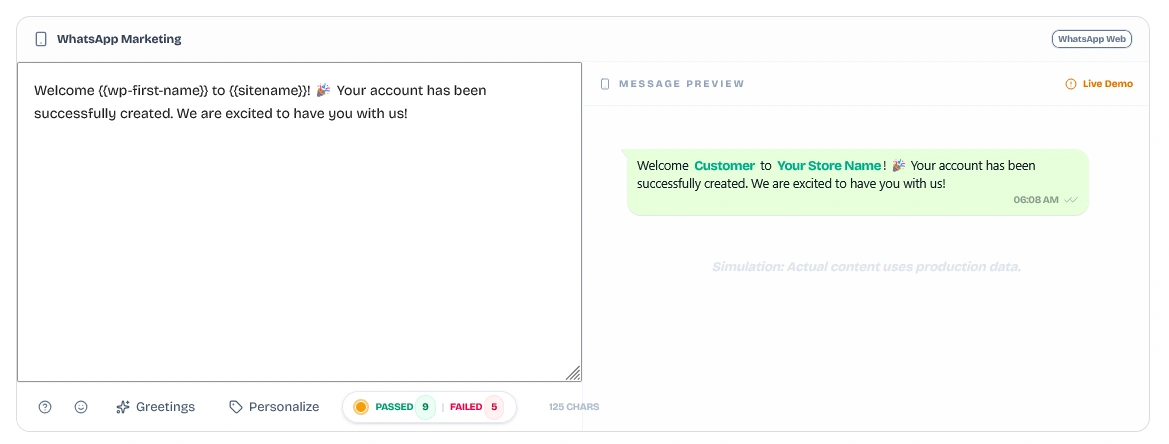
The editor is built with a highly responsive, split-pane layout to ensure maximum clarity when composing messages:
-
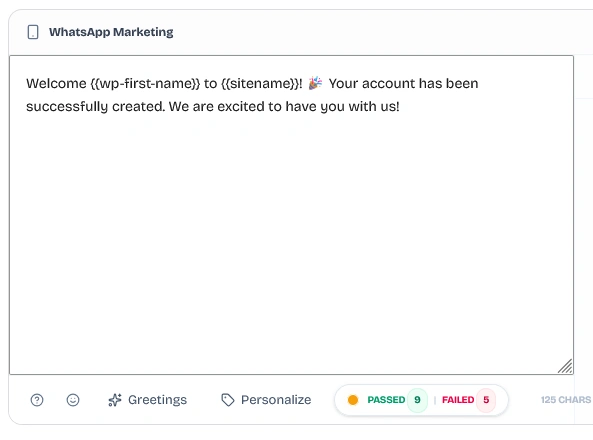
Left Pane (The Composer Workspace): A rich-text text area where you write your message body, insert dynamic merge tags, configure random greetings, style text weights, and monitor character counts.
-
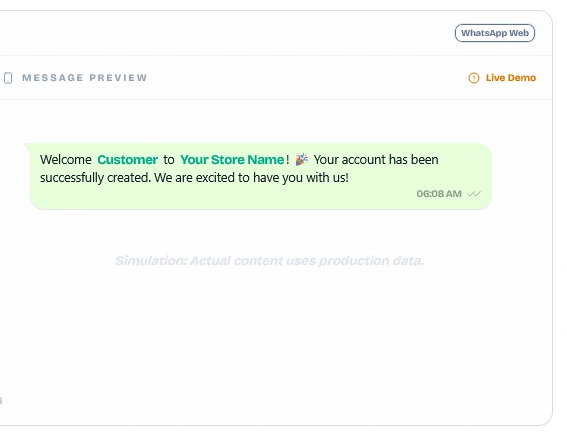
Right Pane (The Smartphone Live Preview): A high-fidelity smartphone simulator displaying a real-time preview of the message. This pane shows exactly how the text will render on your customer's WhatsApp application, simulating chat bubbles, timezone timestamps, verified checkmarks, and bold/italic styles.
Located in the bottom-left toolbar of the Composer Workspace, several productivity and design tools assist in building highly engaging messages:

Clicking the Personalize (tag icon) button opens the dynamic variables dialog. This dialog allows you to search and insert database-backed placeholders that Wawp automatically replaces with customer details during delivery:
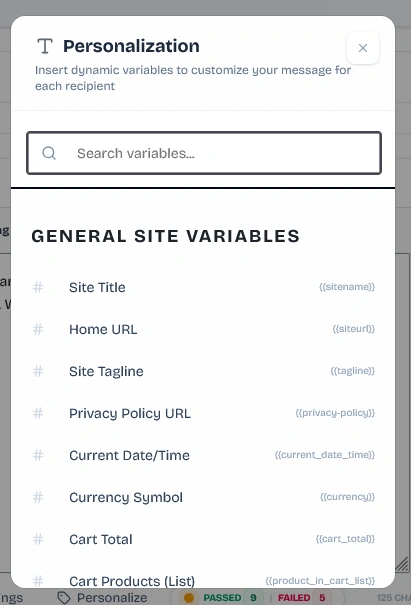
- General Site Variables: e.g.
{sitenamel} (Site Title), {siteurl} (Home URL), {tagline} (Site Tagline), {privacy-policy} (Privacy Policy Link), and {current_date_time}.
- WooCommerce Context Variables: e.g.
{cart_total} (Total checkout cart value) and {product_in_cart_list} (A clean summary list of products in their cart).
Clicking the Greetings (sparkles icon) button opens a smart SpinTax generator. Since WhatsApp's anti-spam algorithms flag accounts that send identical messages to many contacts in rapid succession, using SpinTax randomizes your greeting templates automatically for every single recipient:
- English Greetings Option:
{Hi {{user_login}} 👋|Hello {{user_login}}!|Hey {{user_login}}!|Greetings {{user_login}}!}
- English Welcome Option:
{Welcome to {{site_name}}!|Glad to have you at {{site_name}}!|Welcome aboard to {{site_name}}!}
- Arabic Greetings Option:
{أهلاً بك|يا هلا وغلا|مرحباً بك|يا هلا بك|سعدنا بوجودك}
- Arabic Salutation Option:
{السلام عليكم|السلام عليكم ورحمة الله وبركاته|وعليكم السلام ورحمة الله وبركاته}
Clicking the Formatting button displays a cheat sheet of native WhatsApp styling markup symbols. Selecting any text in your composer and tapping a formatting shortcut instantly applies the markers:
*Bold* (surrounds text with asterisks *text* to render as bold)._Italic_ (surrounds text with underscores _text_ to render as italic).~Strikethrough~ (surrounds text with tildes ~text~ to strike through text).```Monospace``` (surrounds text with triple backticks to render in monospace font).* Bullet Item (formats lists as bulleted lists).1. Ordered Item (formats lists as numbered lists).> Quote (creates blockquotes).
Built directly within Wawp's composer is a powerful AI Spam & Compliance Checker. Located next to the character counter in the footer, this engine evaluates your message across dozens of criteria in under 280ms, providing a color-coded Passed | Failed metric badge.
Clicking the badge slides open a detailed diagnostic panel categorized into three core areas:
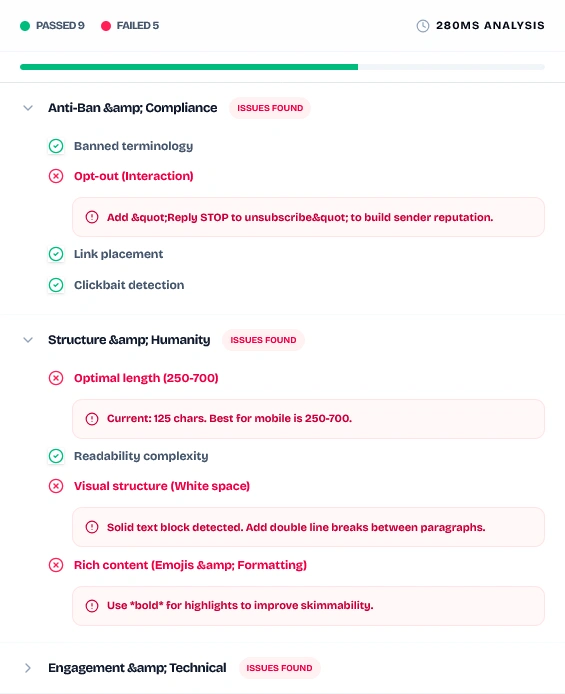
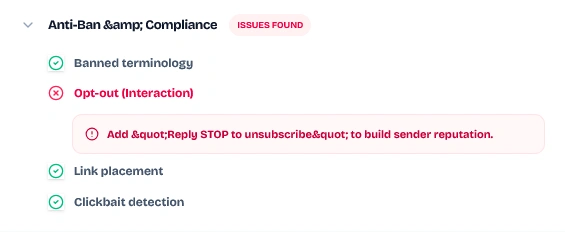
- Banned Terminology: Audits your copy against Wawp's global list of banned terms and carrier-flagged words to avoid immediate handset blocks.
- Opt-out (Interaction): Scans for the presence of opt-out instructions (e.g. Reply STOP to unsubscribe). Including this is vital for building sender reputation and keeping spam reports low.
- Link Placement: Warns you if a URL/link is placed too early in the message (within the first 40 characters). WhatsApp filters flag messages that lead with link URLs as high-risk spam.
- Clickbait Detection: Identifies and flags aggressive urgency terms (such as عاجل, فزت, مبروك, الآن, اربح, winner, prize, urgent, or click here).
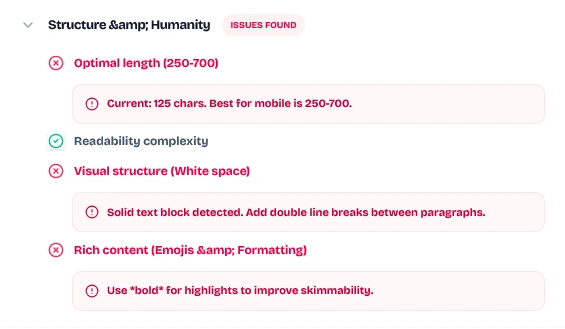
- Optimal Length: Recommends keeping messages between 250 and 700 characters. Messages that are too short feel like spam pings, while excessively long blocks degrade mobile readability.
- Readability Complexity: Measures sentence structures. If sentences average more than 18 words, it flags a warning and recommends breaking text into shorter, skimmable lines.
- Visual Structure (White Space): Warns you if the text is structured as a single solid block. The diagnostic tool recommends adding double line breaks (
\n\n) between paragraphs to create breathing room.
- Rich Content: Audits if you have included formatting style highlights (like
*bold*) to improve visual hierarchy, and a few emojis to ensure the template looks like a human-to-human interaction.
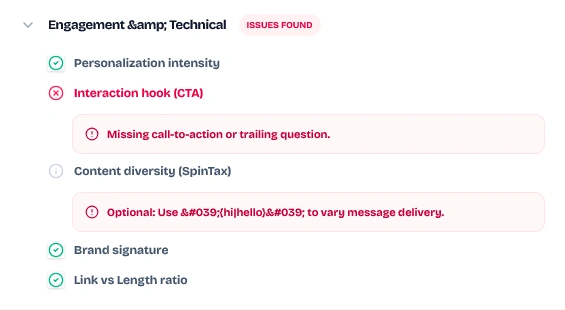
- Personalization Intensity: Flags static templates and ensures you are using dynamic variables to make each notification unique.
- Interaction Hook (CTA): Looks for questions or call-to-action keywords encouraging customers to reply. Re-initiating two-way conversations significantly builds up your WhatsApp sender trust score.
- Content Diversity (SpinTax): Verifies that you are using SpinTax placeholders (e.g.
{Hi|Hello}) to constantly vary the text payload sent to WhatsApp's API.
- Brand Signature: Checks if your site brand signature (
{{sitename}}) is included at the end of the message.
- Link vs Length Ratio: Flags short messages containing URLs. Dispatching a link within a tiny text block is a primary spam signal.
- OTP UX Strategy: For verification OTP templates, the checker verifies that the code variable (
{{otp}}) is placed at the absolute start of the message, ensuring customers can read it instantly on mobile notification previews.
The Smart WhatsApp Editor automatically adapts its visual settings depending on the messaging gateway selected for the trigger:
When routing notifications through your local connected WhatsApp Web instances, the editor runs in full free-form text mode. It enables all personalization variables, SpinTax, and AI spam checker panels to help you optimize delivery.
When utilizing the official WhatsApp Business Cloud API, the editor enables a top header toggle allowing you to switch between two composition modes:
- Template Mode: Disables the free-form editor and displays a searchable Target Template dropdown listing all pre-approved Meta templates registered on your WhatsApp Business account (complete with language variables).
- Session / Free Mode: If a customer has initiated a conversation with your store within the 24-hour customer service window, Wawp allows you to send free-form session messages. In this mode, the rich editor, live previews, and anti-ban diagnostics are fully enabled.
The Wawp WhatsApp Editor is natively loaded across multiple dashboards within your WordPress system:
- Automated Notifications: Managing e-commerce transactional flows (Flow Builder).
- Bulk Campaigns: Composing bulk marketing broadcasts to lists.
- Send Message Drawer: Manual admin outreach sheets in the Activity Hub.
- metabox Sidebars: The manual Actions panel inside the WooCommerce Edit Order screen.
